Introduction to JSON Web Tokens (JWT) and Auth0
JSON Web Tokens (JWTs) are a compact, URL-safe means of representing claims to be transferred between two parties. They are widely used for jwt authentication and information exchange in modern web applications. Auth0 is a popular identity management platform, and they provide a robust Java library, com.auth0.jwt (java jwt), to handle JWT operations. JSON Web Tokens are often simply referred to as tokens or web tokens.
A JWT consists of three parts: the jwt header, the jwt payload, and the jwt signature. This guide will walk you through the essential steps to integrate and utilize the com.auth0.jwt library in your Java projects for verifying, decoding, and creating JWTs.
Step 1: Add the com.auth0.jwt Dependency
First, you need to add the java-jwt dependency to your project’s build file. Below are examples for Maven and Gradle.
Maven
XML
<dependency>
    <groupId>com.auth0</groupId>
    <artifactId>java-jwt</artifactId>
    <version>4.4.0</version> </dependency>
Gradle
Gradle
implementation 'com.auth0:java-jwt:4.4.0' // Use the latest version
Step 2: How to Verify a JWT with com.auth0.jwt (JWT Verification)
Verifying a JWT is crucial for ensuring its authenticity and integrity. This involves checking the jwt signature and validating its claims (e.g., expiration, issuer, audience). The verification process uses a jwt algorithm (like HMAC256 along with a secret key (public or private) to recreate and compare the jwt signature.
Java
import com.auth0.jwt.JWT;
import com.auth0.jwt.JWTVerifier;
import com.auth0.jwt.algorithms.Algorithm;
import com.auth0.jwt.exceptions.JWTVerificationException;
import com.auth0.jwt.interfaces.DecodedJWT;

public class JwtVerifierExample {

    public static void main(String[] args) {
        String token = "YOUR_SAMPLE_JWT_HERE"; // Replace with an actual sample jwt
        String secret = "YOUR_SECRET_KEY"; // Replace with your secret key

        try {
            Algorithm algorithm = Algorithm.HMAC256(secret);
            JWTVerifier verifier = JWT.require(algorithm) // Uses jwt require method
                .withIssuer("auth0") // Validates expected issuer claim
                .withAudience("your-app") // Validates expected audience
                .build(); // Reusable verifier instance

            DecodedJWT jwt = verifier.verify(token);
            System.out.println("JWT is valid! Subject: " + jwt.getSubject());
            // Claims table can be retrieved from the DecodedJWT object
        } catch (JWTVerificationException exception) {
            // Invalid signature/claims
            System.err.println("JWT Verification Failed: " + exception.getMessage());
        }
    }
}
Step 3: How to Decode a JWT (Inspect JWT Payload and Header)
Sometimes you might need to inspect the contents of a JSON Web Token without verifying its jwt signature. This is useful for debugging or previewing claims, but should NOT be used for security-sensitive decisions regarding user access. The jwt decode function is used for this purpose.
Java
import com.auth0.jwt.JWT;
import com.auth0.jwt.interfaces.DecodedJWT;

public class JwtDecoderExample {

    public static void main(String[] args) {
        String token = "YOUR_JWT_STRING_HERE"; // Replace with an actual JWT

        try {
            DecodedJWT jwt = JWT.decode(token); // jwt decode method

            System.out.println("JWT Header: " + jwt.getHeader()); // Accesses the jwt header
            System.out.println("JWT Payload: " + jwt.getPayload()); // Accesses the jwt payload
            System.out.println("JWT Signature: " + jwt.getSignature());
            System.out.println("Custom Claim 'name': " + jwt.getClaim("name").asString()); // Accessing custom claims

        } catch (Exception e) {
            System.err.println("Error decoding JWT: " + e.getMessage());
        }
    }
}

---

## Step 4: How to Create a JWT with com.auth0.jwt

Creating a **JWT** involves defining its **claims** (**jwt payload**), setting an expiration time, and signing it with a **jwt algorithm** and a **secret key** (or **private key**). This process uses the **jwt builder** pattern.

```java
import com.auth0.jwt.JWT;
import com.auth0.jwt.algorithms.Algorithm;
import java.util.Date;
import java.util.Calendar;

public class JwtCreatorExample {

    public static void main(String[] args) {
        String secret = "YOUR_SECRET_KEY"; // Replace with a strong secret key
        String issuer = "auth0";
        String audience = "your-app";
        String subject = "user123";

        try {
            Algorithm algorithm = Algorithm.HMAC256(secret);

            // Set expiration time (e.g., 1 hour from now)
            Calendar calendar = Calendar.getInstance();
            calendar.add(Calendar.HOUR_OF_DAY, 1);
            Date expiresAt = calendar.getTime();

            String token = JWT.create()
                .withIssuer(issuer)
                .withAudience(audience) // Standard claim
                .withSubject(subject)
                .withClaim("name", "John Doe") // Custom claim
                .withClaim("admin", true) // Another custom claim
                .withIssuedAt(new Date())
                .withExpiresAt(expiresAt)
                .sign(algorithm); // Generates the final jwt signature

            System.out.println("Generated JWT: " + token);

        } catch (Exception e) {
            System.err.println("Error creating JWT: " + e.getMessage());
        }
    }
}
Conclusion
The com.auth0.jwt library provides a comprehensive and easy-to-use API for handling JSON Web Tokens in Java. By following these steps, you can securely verify, jwt decode, and create JWTS, enhancing the security of your applications. Always remember to keep your secret key secure and handle exceptions appropriately to build robust systems. The auth0 jwt toolset makes jwt authentication reliable in Java.
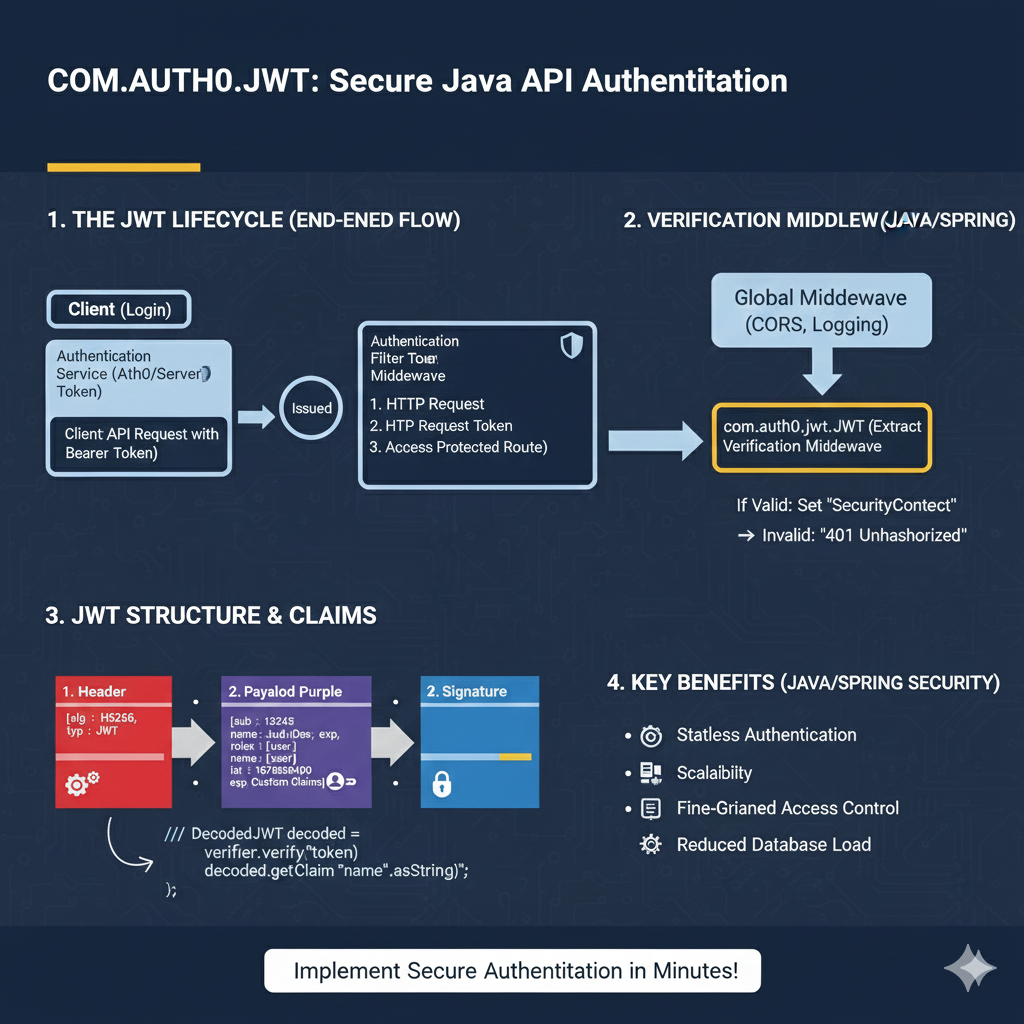
COM.AUTH0.JWT Infographic
This infographic breaks down the secure authentication process using the Auth0 JWT library in a Java API environment.
1. The JWT Lifecycle (End-to-End Flow) 🔄
This section illustrates the path of the token from issuance to validation on the server.
- Client (Login): The client obtains an Authentication Token from the Identity Provider (Auth0/Server).
- Issued: The token is received by the client.
- Authentication Middleware: The server receives the client request with the Bearer Token. The token goes through a filter/middleware before accessing the protected route.
- Verification Middleware: The request passes through Global Middleware (CORS, Logging) and then hits the
com.auth0.jwtverification middleware.- If Valid: The server sets the “Security Context”.
- If Invalid: The server returns a “401 Unauthorized” response.
2. JWT Structure & Claims 🧩
This section details the anatomy of the token and how the Java library interacts with its parts.
- 1. Header (Red): Contains metadata like
alg: HS256andtyp: JWT. - 2. Payload (Purple): Contains the user and authorization Claims. Example claims include
sub: 13245,name: JudiDoe, andexp: 1678890000(expiration). - 3. Signature (Blue): The cryptographic hash used solely for verification.
The library decodes and verifies the token using Java code similar to: verifier.verify(token) and decoded.getClaim("name").asString().
3. Key Benefits (Java/Spring Security) ✨
The use of JWTs offers several architectural advantages for Java APIs.
- Stateless Authentication: The server doesn’t need to store session data.
- Scalability: Easier to distribute load across multiple servers without shared session storage.
- Fine-Grained Access Control: Permissions can be stored directly in the token payload.
- Reduced Database Load: Fewer database lookups are needed per request since user details are in the token.
learn for more knowledge
Json Parser ->What Is jQuery JSON Parser, jQuery. Parse.Json, JSON.parse, jQuery.getJSON, ParseJSON Explanation) – json parse
MyKeywordrank ->SEO Optimization Checker: Mastering Website SEO Optimization and Rankings – keyword rank checker
Json Compare ->What is Compare JSON Objects Online: Beginner-Friendly Guide – online json comparator
Leave a Reply