In the realm of modern application development, securing user authentication and authorization is paramount. Auth0 provides a robust platform for identity management, and at its core are Auth0 tokens. Understanding how to effectively obtain, validate, and utilize these tokens is crucial for building secure and scalable applications. This guide will walk you through the essentials of managing Auth0 tokens, helping you to boost your application’s security posture and user experience.
What Are Auth0 Tokens?
Auth0 tokens are standardized security tokens used to convey information about an authenticated user or grant authorization to access resources. They come primarily in three types, each serving a distinct purpose in the authentication and authorization flow facilitated by Auth0.
Types of Auth0 Tokens
- ID Token (JWT): This token contains profile information about the user, such as their name, email, and other attributes. It’s primarily used by the client application to know who the user is. ID tokens are JSON Web Tokens (JWTs) and are signed to ensure their integrity.
- Access Token (JWT): Used to authorize access to protected resources (APIs). When a client application wants to call an API, it sends the access token, and the API validates it to determine if the client has the necessary permissions. Access tokens are also JWTs and typically have a shorter lifespan.
- Refresh Token: A long-lived credential used to obtain new access tokens and ID tokens after the original ones expire, without requiring the user to log in again. Refresh tokens should be handled with extreme care due to their sensitive nature.
How to Obtain Auth0 Tokens
Obtaining tokens typically happens after a successful user authentication flow. Auth0 SDKs simplify this process for various platforms.
Client-Side (SPA/Mobile) Example
When using Auth0’s Single-Page Application (SPA) SDK, tokens are usually retrieved after a successful login redirect or silent authentication.
// Example using Auth0 SPA SDK for JavaScript
import { createAuth0Client } from '@auth0/auth0-spa-js';

const auth0 = await createAuth0Client({
  domain: 'YOUR_AUTH0_DOMAIN',
  clientId: 'YOUR_AUTH0_CLIENT_ID',
  authorizationParams: {
    redirect_uri: window.location.origin
  }
});

await auth0.loginWithRedirect(); // User logs in

// After redirect, check for login state and get tokens
if (window.location.search.includes('code=')) {
  await auth0.handleRedirectCallback();
  const accessToken = await auth0.getTokenSilently();
  const idTokenClaims = await auth0.getIdTokenClaims();
  console.log('Access Token:', accessToken);
  console.log('ID Token Claims:', idTokenClaims);
}
Server-Side Applications
For server-side applications, you might use an Authorization Code Grant flow, where an authorization code is exchanged for tokens at the token endpoint.
// Pseudo-code for exchanging authorization code for tokens
POST /oauth/token HTTP/1.1
Host: YOUR_AUTH0_DOMAIN
Content-Type: application/x-www-form-urlencoded

grant_type=authorization_code&
client_id=YOUR_AUTH0_CLIENT_ID&
client_secret=YOUR_AUTH0_CLIENT_SECRET&
code=YOUR_AUTHORIZATION_CODE&
redirect_uri=YOUR_REDIRECT_URI
How to Validate Auth0 Tokens
Token validation is critical to ensure that tokens are legitimate, haven’t been tampered with, and are still valid.
Validating ID Tokens (Client-Side)
ID tokens can be validated on the client side to verify user identity. This involves checking the signature against Auth0’s public keys, verifying issuer, audience, and expiration claims. Auth0 SDKs handle this automatically.
Validating Access Tokens (Server-Side)
APIs must validate access tokens sent by client applications. This is typically done by:
- Checking the token signature: Using Auth0’s JSON Web Key Set (JWKS) endpoint to retrieve public keys.
- Verifying the issuer (
issclaim): Ensuring the token came from your Auth0 tenant. - Verifying the audience (
audclaim): Ensuring the token is intended for your API. - Checking expiration (
expclaim): Ensuring the token has not expired. - Checking scopes (
scopeclaim): Ensuring the token grants the necessary permissions.
// Example: Simplified Node.js validation using jsonwebtoken and jwks-rsa
const jwt = require('jsonwebtoken');
const jwksClient = require('jwks-rsa');

const client = jwksClient({
  jwksUri: `https://${process.env.AUTH0_DOMAIN}/.well-known/jwks.json`
});

function getKey(header, callback){
  client.getSigningKey(header.kid, function(err, key) {
    const signingKey = key.publicKey || key.rsaPublicKey;
    callback(null, signingKey);
  });
}

function validateAccessToken(token) {
  return new Promise((resolve, reject) => {
    jwt.verify(token, getKey, {
      audience: process.env.AUTH0_AUDIENCE,
      issuer: `https://${process.env.AUTH0_DOMAIN}/`,
      algorithms: ['RS256']
    }, (err, decoded) => {
      if (err) {
        return reject(err);
      }
      resolve(decoded);
    });
  });
}

// In your API endpoint:
// try {
//   const decodedToken = await validateAccessToken(req.headers.authorization.split(' ')[1]);
//   // Token is valid, proceed with request
// } catch (error) {
//   // Token is invalid
//   res.status(401).send('Unauthorized');
// }
Securely Using Auth0 Tokens
Proper handling of tokens is paramount to prevent security vulnerabilities.
- Store Tokens Securely:
- For SPAs: Use in-memory storage or Web Workers (with caution). Avoid
localStoragefor access/refresh tokens due to XSS risks. - For server-side: Store refresh tokens encrypted in a secure database.
- For SPAs: Use in-memory storage or Web Workers (with caution). Avoid
- Transmit Tokens via HTTPS: Always send tokens over secure channels to prevent interception.
- Send Access Tokens in
AuthorizationHeader: Typically as a Bearer token:Authorization: Bearer YOUR_ACCESS_TOKEN. - Handle Token Expiration and Renewal: Implement logic to gracefully renew access tokens using refresh tokens (or silent authentication for SPAs) before they expire.
Best Practices for Auth0 Token Management
- Keep Access Tokens Short-Lived: This minimizes the impact of a compromised token.
- Use Refresh Tokens Strategically: Grant them only when necessary (e.g., for long-lived sessions) and revoke them if suspicious activity is detected.
- Define Specific Audiences and Scopes: Ensure tokens are granted only for the resources and permissions they need.
- Implement Token Revocation: Provide mechanisms to revoke refresh tokens and (less commonly) access tokens when a user logs out or if a token is compromised.
- Log and Monitor Token Activity: Keep an eye on authentication and token issuance events for auditing and security analysis.
Conclusion
Auth0 tokens are fundamental to building secure and efficient identity solutions. By understanding their types, mastering the methods for obtaining and validating them, and adhering to best practices for secure usage, you can significantly enhance the security and reliability of your applications. Always prioritize security in your token management strategy to protect both your users and your resources.
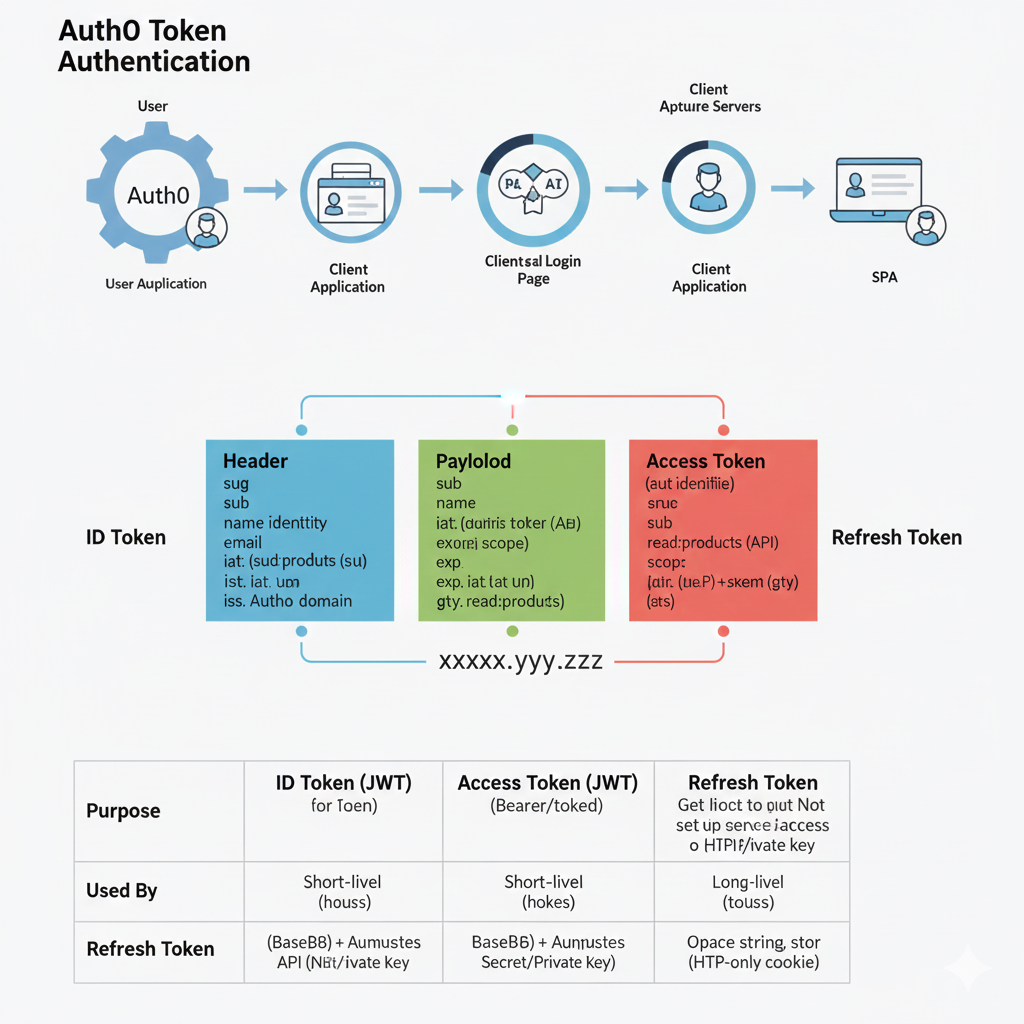
Auth0 Token Authentication Flow
The top section illustrates the sequence of actions that occur during the authentication process:
- User Authentication: A User interacts with the User Application which involves Auth0.
- Client Application: The flow moves to the Client Application.
- Client Login Page: The user is directed to the Client/Auth0 Login Page where credentials are provided.
- Client Application (Token Received): The authenticated user returns to the Client Application with the tokens.
- SPA (Single Page Application): The client application uses the tokens to access the secure SPA.
🔑 Token Structure (ID Token)
The graphic details the structure of a standard JSON Web Token (JWT), which is used for the ID Token and Access Token (represented as XXXXX.yyy.ZZZ).
- Header (Blue): Contains metadata like the algorithm used (
alg). - Payload (Green): Contains user information and claims.
- Claims: Includes
sub(subject),name,email,exp(expiration time), andscope.
- Claims: Includes
- Access Token (Red): This is a separate token, also a JWT, containing specific claims for API access.
- Claims: Includes
aut idenlifiie(client ID),sub,scope(permissions likeread:products), and audience (aud).
- Claims: Includes
📄 Token Purpose and Usage (Comparison Table)
The bottom table summarizes the key differences between the three token types:
| Feature | ID Token (JWT) | Access Token (JWT) | Refresh Token |
| Purpose | Used for Toekn (authentication/verification of the user’s identity). | Bearer/toked (authorization to access protected API resources). | Used to get a new Access Token without re-logging in. |
| Used By | Short-livel (hours). | Short-livel (hours). | Long-livel (years). |
| Refresh Token | Base64 + Private Key (used to secure the token). | Base64 + Private Key. | An Opace string, stored as an HTTP-only cookie. |
learn for more knowledge
Json parser-> How to express json body parser- A Complete Guide – json parse
Mykeywordrank-> Search Optimization SEO: Master Search Engine Optimization for Top Rankings – keyword rank checker
Json Compare ->Compare JSON File Online: Your Essential JSON Diff and Format Guide – online json comparator
Fake Json –>How to Create Fake JSON API for Faster Development and Testing – fake api
Leave a Reply