Introduction to JWKS
In the world of secure API authentication and authorization, JSON Web Tokens (JWTs) have become a standard. While JWTs provide a compact and secure way to transmit information, verifying their authenticity requires a robust mechanism for managing cryptographic keys. This is where JSON Web Key Sets (JWKS) come into play. This guide will walk you through how to use JWKS effectively, ensuring your applications communicate securely.
What is a JSON Web Key Set (JWKS)?
A JWKS is a set of JSON Web Keys (JWK). A JWK is a JavaScript Object Notation (JSON) data structure that represents a cryptographic key. Essentially, a JWKS is a public endpoint provided by an authorization server (issuer) that contains all the public keys it uses to sign JWTs. Client applications (consumers or verifiers) can fetch this set of keys to verify the signatures of incoming JWTs without needing to store the public keys locally.
Key components of a JWK include:
kty(Key Type): Identifies the cryptographic algorithm family used with the key, e.g., “RSA” or “EC”.use(Public Key Use): How the public key is used, e.g., “sig” for signature verification.kid(Key ID): A unique identifier for the key within the JWKS. This helps clients select the correct key.alg(Algorithm): The specific algorithm used with the key, e.g., “RS256”.- Public Key Parameters: Specific to the key type, e.g.,
n(modulus) ande(exponent) for RSA keys.
Why Use JWKS for API Security?
JWKS offers several significant advantages:
- Key Rotation: It simplifies key management, allowing authorization servers to rotate keys frequently without requiring manual updates on every client application. Clients simply fetch the latest JWKS.
- Dynamic Key Discovery: Clients can dynamically discover the public keys needed to verify JWTs, making integration smoother and reducing configuration overhead.
- Scalability: Centralized key management provided by JWKS scales well for distributed systems and microservices architectures.
- Standardization: It’s a standard defined by RFC 7517 and RFC 7518, promoting interoperability across different platforms and services.
How JWKS Works: The JWT Verification Process
When a client application receives a JWT, it performs the following steps to verify its signature using JWKS:
- Extract Key ID (
kid): The client first inspects the JWT header to find thekidclaim, which identifies the specific key used to sign the token. - Fetch JWKS: If the client doesn’t have the current JWKS cached or if the
kidisn’t found in the cached set, it makes an HTTP GET request to the authorization server’s JWKS endpoint (often/.well-known/jwks.json). - Select Public Key: From the fetched JWKS, the client uses the
kidfrom the JWT header to locate the corresponding public key. - Verify Signature: The client then uses this public key to verify the JWT’s signature. If the signature is valid, the token is deemed authentic.
- Validate Claims: Beyond signature verification, the client also validates other JWT claims like expiration time (
exp), issuer (iss), and audience (aud).
Practical Implementation: How to Use JWKS
Server-Side (Issuer): Providing Your JWKS Endpoint
As an authorization server, you need to expose a public endpoint that serves your JWKS. This endpoint typically resides at a well-known URI.
Example JWKS endpoint:
GET https://your-auth-server.com/.well-known/jwks.jsonA sample JWKS structure might look like this:
{
  "keys": [
    {
      "p": "...",
      "kty": "RSA",
      "q": "...",
      "d": "...",
      "e": "AQAB",
      "use": "sig",
      "qi": "...",
      "dp": "...",
      "alg": "RS256",
      "dq": "...",
      "n": "...",
      "kid": "unique-key-id-1"
    },
    {
      "kty": "EC",
      "crv": "P-256",
      "x": "...",
      "y": "...",
      "use": "sig",
      "alg": "ES256",
      "kid": "unique-key-id-2"
    }
  ]
}
Most identity providers (like Auth0, Okta, AWS Cognito) automatically provide this endpoint for you.
Client-Side (Consumer/Verifier): Consuming a JWKS
As a client, you’ll need to fetch the JWKS and use it to verify JWTs. Here’s a conceptual approach:
- Locate JWKS URI: This is often found in the OpenID Connect discovery document (
/.well-known/openid-configuration) under thejwks_urifield. - Fetch and Cache: Make an HTTP GET request to the
jwks_uri. It’s crucial to cache this response, but also implement a refresh mechanism (e.g., re-fetch after a certain interval or upon encountering an unknownkid). - Parse JWT Header: Extract the
kidandalgfrom the incoming JWT’s header. - Select Key: Find the key in your cached JWKS that matches the
kidfrom the JWT header. - Verify Signature: Use a cryptographic library to verify the JWT’s signature with the selected public key.
Example Python code snippet for JWT verification using PyJWT and a JWKS:
import jwt
import requests

JWKS_URL = "https://your-auth-server.com/.well-known/jwks.json"
CACHED_JWKS = None

def get_jwks():
    global CACHED_JWKS
    if CACHED_JWKS is None:
        response = requests.get(JWKS_URL)
        response.raise_for_status()
        CACHED_JWKS = response.json()
    return CACHED_JWKS

def verify_jwt(token):
    jwks = get_jwks()
    header = jwt.get_unverified_header(token)
    kid = header['kid']

    for key in jwks['keys']:
        if key['kid'] == kid:
            # Reconstruct the public key from JWK format
            # This typically involves converting JWK to a format suitable for the crypto library
            # For PyJWT, you often need to convert it to a PEM format or use a JWKS client library
            try:
                # For simplicity, assuming the key is directly usable or a library handles conversion
                public_key = jwt.algorithms.RSAAlgorithm.from_jwk(key)
                payload = jwt.decode(token, public_key, algorithms=[header['alg']], audience="your-api-audience", issuer="your-auth-server.com")
                return payload
            except Exception as e:
                print(f"Error verifying JWT with key {kid}: {e}")
                raise
    raise ValueError(f"No matching key found for kid: {kid}")

# Example usage:
# your_jwt_token = "eyJ..."
# try:
#     decoded_payload = verify_jwt(your_jwt_token)
#     print("JWT successfully verified:", decoded_payload)
# except ValueError as e:
#     print("JWT verification failed:", e)
Note: In a production environment, it’s recommended to use a battle-tested library that handles JWKS fetching and caching automatically, such as python-jose or node-jwks-rsa, as reconstructing public keys and handling all edge cases manually can be complex.
Best Practices for JWKS Implementation
- Cache JWKS Aggressively: Minimize network calls by caching the JWKS locally, but implement a proper refresh strategy.
- Handle Key Rotation: Your client should be resilient to new keys appearing and old keys disappearing from the JWKS. If a
kidisn’t found, try refreshing the cache. - Secure JWKS Endpoint: While the JWKS itself contains public keys, ensure the endpoint serving it is over HTTPS to prevent tampering and ensure authenticity.
- Validate Other Claims: Always validate the JWT’s issuer (
iss), audience (aud), and expiration (exp) in addition to the signature. - Error Handling: Implement robust error handling for network issues, malformed JWKS responses, and invalid keys.
Common Pitfalls and How to Avoid Them
- Not Caching JWKS: Repeatedly fetching the JWKS for every token verification can lead to performance bottlenecks and rate limits. Cache it!
- Stale JWKS Cache: If you cache indefinitely, your application won’t pick up new keys, leading to verification failures when keys are rotated. Implement a TTL or re-fetch on unknown
kid. - Ignoring
kid: Always use thekidfrom the JWT header to select the correct public key. Trying all keys in the set can be inefficient or incorrect. - Using HTTP for JWKS: Never fetch JWKS over plain HTTP. This exposes your application to potential man-in-the-middle attacks where an attacker could provide malicious public keys.
Conclusion
JWKS provides a standardized, robust, and scalable way to manage public keys for JWT signature verification. By understanding how to implement and use JWKS correctly, both on the server-side (as an issuer) and client-side (as a verifier), you can significantly enhance the security and maintainability of your API authentication mechanisms. Embrace JWKS to simplify key rotation and ensure your applications remain secure and interoperable.
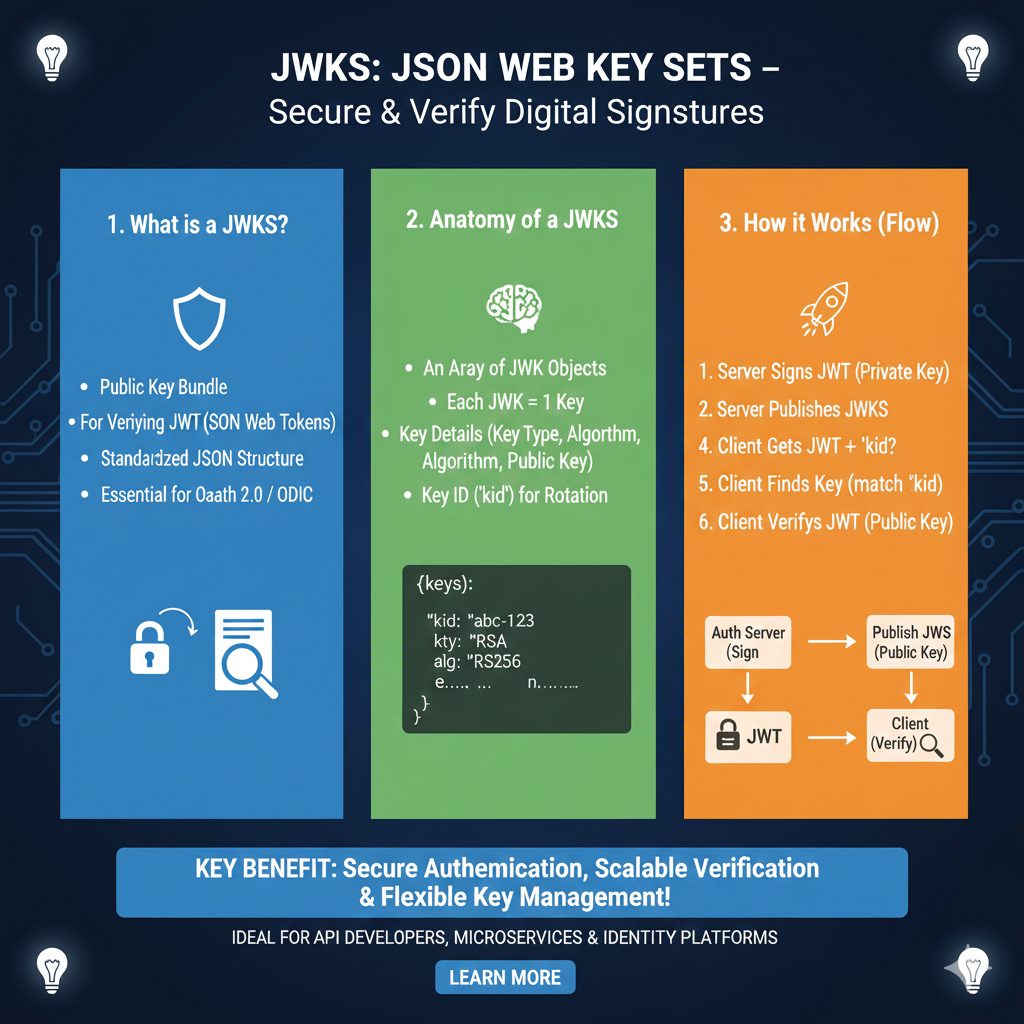
The JWKS Ecosystem & Verification Flow
The infographic breaks down the life of a public key from its publication to its role in securing user identity:
1. Anatomy of a JWK (Blue)
Before keys are bundled into a set, each individual JSON Web Key (JWK) must be properly structured:
- Key Identifier (
kid): A unique ID used to match the correct key in the set to the one used in a JWT’s header. - Algorithm (
alg): Specifies the cryptographic algorithm, such as RS256 (RSA) or ES256 (Elliptic Curve). - Public Key Material: Contains the mathematical components for verification, such as modulus (
n) and exponent (e) for RSA, or coordinates (x,y) for EC keys. - Intended Use (
use): Indicates if the key is for signature verification (sig) or encryption (enc).
2. The JWKS Endpoint (Green)
This section illustrates how the authorization server hosts and shares its public keys:
- Standardized Path: The set is typically published at a publicly accessible URL, often found at
/.well-known/jwks.json. - The “Keyring” Concept: A JWKS is essentially an array or collection of these individual JWK objects bundled into a single JSON response.
- Interoperability: By following RFC 7517, different services can automatically fetch and use these keys without custom code for every identity provider.
3. Secure Verification & Lifecycle (Orange)
The final pillar details how applications use the JWKS to ensure security during API calls:
- Dynamic Verification: When a JWT arrives, the application fetches the JWKS, finds the matching
kid, and verifies the signature—ensuring the token hasn’t been tampered with. - Seamless Key Rotation: Organizations can add new keys to the JWKS before retiring old ones, allowing for security updates without any application downtime or code redeployment.
- Security Best Practices: Keys should be served over HTTPS, and applications should cache the JWKS locally to reduce latency while refreshing on verification errors.
learn for more knowledge
Mykeywordrank-> SEO Search Engine Optimization: Mastering the Search Engine for Traffic – keyword rank checker
json parser->How to Parse json file parser- A Comprehensive Guide for Developers – json parse
Json Compare ->How to Effectively Use a JSON Compare Tool for Data Analysis – online json comparator
Fake Json –>How to Easily Use Dummy JSON URL for Efficient Testing and Development – fake api
Leave a Reply