Introduction to auth0 jwks and json web token Verification
In today’s microservices-driven architecture, securing your api and ensuring only authorized clients can access resources is paramount. A json web token (jwt) has emerged as the standard for this purpose, providing a compact, URL-safe way to transmit information between a tenant and a web application. When using auth0 for authentication, performing signature verification on these tokens correctly is crucial for your cryptographic security.
This guide will walk you through understanding the auth0 jwks (json web key set), how to locate your jwks endpoint, and how to use a library to securely verify jwts issued by your auth0 tenant.
What is a jwks (json web key set)?
A json web key set (jwks) is a key set containing the signing keys used to verify any jwt token issued by an authorization server. When a jwt is created, it is signed using a private key. The corresponding rsa public keys are made available via the jwks endpoint, allowing applications to perform signature verification without ever needing access to the private signer key.
- jwk: A json web key representing a single cryptographic key.
- key sets: A collection of multiple jwk objects used for key rotation.
Why jwks is Essential for signature verification
key rotation
The auth0 jwks architecture supports seamless key rotation. When auth0 rotates its signing certificates, your library doesn’t need a manual update; it simply fetches the new key set from the web.
public Key Distribution
It provides a standardized way to distribute signing keys, simplifying the process of signature verification across different services.
Trust and Integrity
Verifying a jwt token against a trusted signing key from a known json web key set ensures the token hasn’t been tampered with.
How to locate Your auth0 jwks endpoint
Locating your jwks endpoint is straightforward. auth0 follows the OpenID Connect discovery specification, meaning the jwks uri is available from your tenant‘s .well-known/openid-configuration.
Identify your auth0 domain in your dashboard. Your jwks endpoint will be:
How to Use jwks to Verify tokens
Verifying a token involves these cryptographic steps:
- Fetch the key set: Use a library to retrieve the json web key set over HTTPS.
- Identify the kid property: Extract the key identifier (kid property) from the jwt header.
- Match the signing key: Find the jwk in the key set that matches the key identifier.
- Verify the algorithm: Ensure the algorithm (e.g., RS256) matches your expected signing method.
Example: jwt Verification in Node.js
Using a library like jwks-rsa makes this process easy:
JavaScript
const jwt = require('jsonwebtoken');
const jwksClient = require('jwks-rsa');

// Configure the jwks library to fetch the signing key
const client = jwksClient({
  jwksUri: 'https://YOUR_TENANT.auth0.com/.well-known/jwks.json'
});

function getKey(header, callback){
  // Locate the specific jwks key using the kid property (key identifier)
  client.getSigningKey(header.kid, function (err, key) {
    const signingKey = key.publicKey || key.rsaPublicKey;
    callback(null, signingKey);
  });
}

// Verify the jwt token
jwt.verify(token, getKey, {
  audience: 'YOUR_API_IDENTIFIER',
  issuer: `https://YOUR_TENANT.auth0.com/`,
  algorithms: ['RS256']
}, function (err, decoded) {
  if (err) {
    console.error('Signature verification failed:', err);
  } else {
    console.log('Successfully verified jwt:', decoded);
  }
});
Best Practices for jwks Implementation
- Caching: Always cache signing certificates to avoid frequent network calls to the jwks endpoint.
- Algorithm Verification: Never trust the algorithm in the header blindly; explicitly define allowed algorithms in your library config.
- kid property Validation: Always use the key identifier to ensure you are using the correct signing key during key rotation.
- Security Headers: Use HTTPS for all web communication involving tokens and key sets.
Conclusion
By mastering auth0 jwks and signature verification, you create a secure foundation for your api. Using a library to handle the json web key set allows your applications to stay resilient during key rotation while keeping your private key safe.
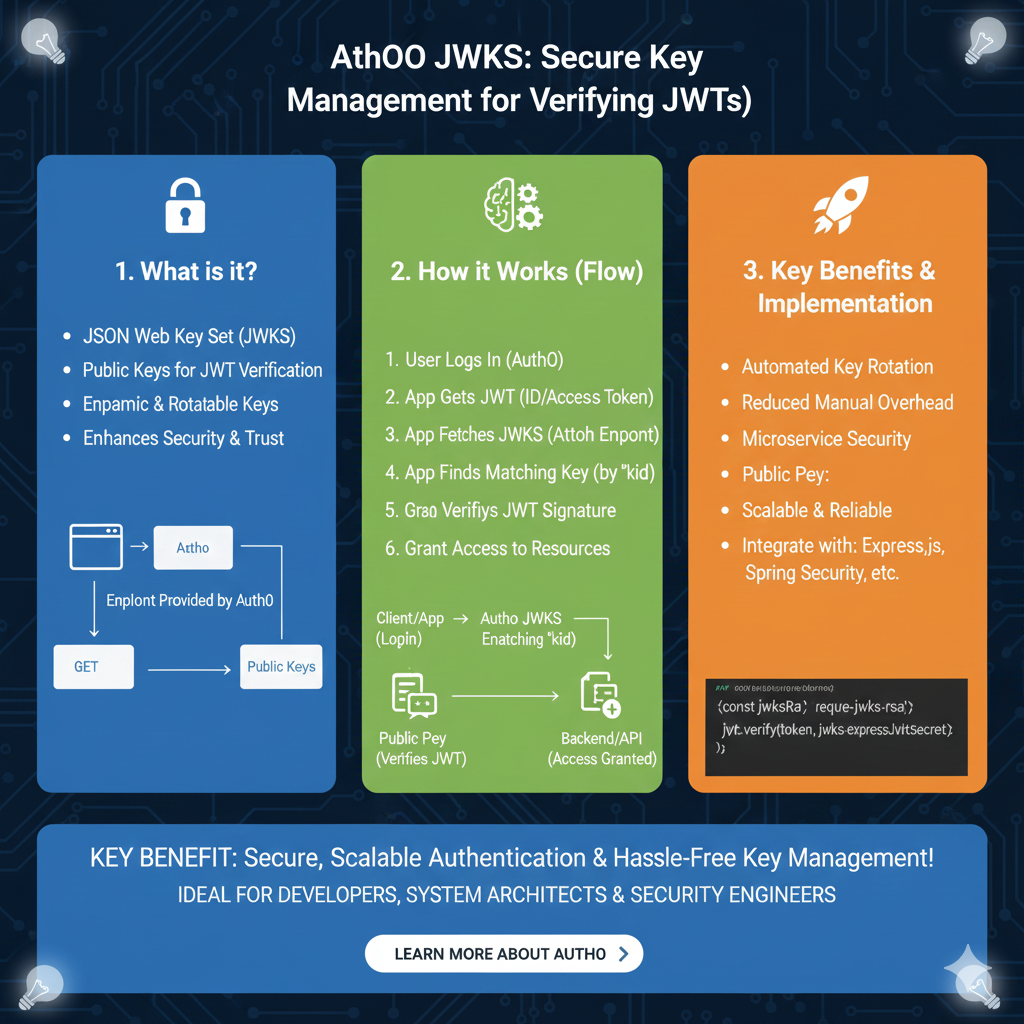
The JWKS Security Framework
This framework details the lifecycle of public keys used to cryptographically verify user identity tokens:
1. What is it? (Blue)
This section defines the foundational concepts of JWKS within the Auth0 ecosystem:
- JSON Web Key Set (JWKS): A set of keys containing the public keys used to verify any JSON Web Token (JWT) issued by the authorization server.
- Public Keys for JWT Verification: These keys allow your application to confirm that a token was truly signed by Auth0 without requiring a shared secret.
- Dynamic & Rotatable Keys: Supports high security by allowing keys to be rotated regularly without breaking the application.
- Enhances Security & Trust: Provides a standardized way to distribute public keys, ensuring only trusted tokens are accepted.
2. How it Works (Flow)
This module illustrates the step-by-step communication between the user, the application, and Auth0:
- Initial Login: The user logs in via Auth0 and the application receives a JWT (ID or Access Token).
- Key Discovery: The application fetches the JWKS from the Auth0
.well-known/jwks.jsonendpoint. - Matching Logic: The app finds the matching public key by checking the Key ID (
kid) header in the JWT. - Validation & Access: Once the signature is verified using the public key, the application grants access to protected resources.
3. Key Benefits & Implementation (Orange)
This pillar highlights why JWKS is the industry standard for scalable security:
- Automated Key Rotation: Systems can automatically switch to new keys, reducing the manual overhead of updating secrets.
- Microservice Security: Ideal for distributed architectures where multiple services need to verify tokens independently.
- Scalable & Reliable: Public key infrastructure allows for highly reliable authentication across millions of users.
- Easy Integration: Supported by major libraries such as
jwks-rsafor Express.js, Spring Security, and others.
learn for more knowledge
Mykeywordrank-> Search for SEO: The Ultimate Guide to Keyword Research and SEO Site Checkup – keyword rank checker
json parser-> How to Parse json format parser: A Comprehensive Guide – json parse
Json Compare ->Compare JSON Data Using a JSON Compare Tool for JSON Data – online json comparator
Fake Json –>dummy user data json- The Ultimate Guide to fake api, jsonplaceholder, and placeholder json data – fake api
Leave a Reply