Understanding Auth0 JWT Tokens: A Comprehensive Guide
JSON Web Tokens (JWTs) are a compact, URL-safe means of representing claims to be transferred between two parties. When you integrate Auth0 into your application, JWT tokens become the cornerstone of your authentication and authorization strategy. This guide will walk you through how to use and verify Auth0 JWT tokens effectively, boosting your application’s security and user experience. These tokens are fundamental to OpenID Connect (OIDC) flows.
What is a JWT Token and Why Auth0 Uses Web Tokens?
A JWT token consists of three parts separated by dots (.): a header, a payload, and a signature. Auth0 issues these json web tokens after a user successfully authenticates. They are stateless, which simplifies scalability for modern applications.
- Header: Specifies the algorithm used for signing (e.g., RS 256).
- Payload: Contains claims or statements about the user and additional data. These include registered claims like iss, exp, and aud, as well as any custom claims or private claims.
- Signature: Used to verify that the sender of the web token is who it says it is and to ensure that the message hasn’t been tampered with. It is created by signing the encoded header and payload with a secret or private key.
How to Obtain an Auth0 JWT Token (JWT Access)
When a user logs in via Auth0, your application typically receives an ID$ Token and/or an Access Token. The ID Token is a JWT token containing user identity (identity), while the Access Token is also a JWT used for authorization (jwt access) to protected API resources (api token).
Token Claims: The ID Token contains standard user claims, while the Access Token contains authorization claims relevant to the API.
Here’s a simplified example of how you might initiate a login flow using Auth0’s JavaScript SDK:
JavaScript
// ... (SDK setup code) ...

async function handleRedirectCallback() {
  if (window.location.search.includes('code=')) {
    await auth0.handleRedirectCallback();
    const token = await auth0.getIdTokenClaims();
    console.log('ID Token:', token.__raw); // This is the raw Auth0 JWT Token

    const accessToken = await auth0.getTokenSilently();
    console.log('Access Token:', accessToken); // This is the JWT Access token
  }
}
// ...
Verifying Auth0 JWT Tokens and Token Lifetime
Verifying a JWT token is crucial for security. It ensures that the token was issued by Auth0 and hasn’t been altered. This process usually happens on your backend server and must respect the token lifetime (exp claim).
1. Check the Signature (Using JWKS)
The signature must be verified using the public key provided by Auth0 (for RS 256). Auth0 provides a JWKS (JSON Web Key Set) endpoint (https://YOUR_AUTH0_DOMAIN/.well-known/jwks.json) which contains the public keys. This is how the API can trust the signed web token.
2. Validate Claims (Registered and Private Claims)
After verifying the signature, you must validate several essential token claims within the payload:
- iss (Issuer): Must match your Auth0 domain.
- aud (Audience): Must match your API identifier.
- exp (Expiration Time): Essential for controlling token lifetime.
- Standard Claims: Check other standard claims (iat, nbf) and any expected private claims or custom claims.
Most JWT libraries will handle these validations automatically once configured correctly. If you need to inspect the contents for debugging or learning, you can use an online jwt debugger.
JavaScript
// Node.js example using express-oauth2-jwt-bearer
const jwtCheck = auth({
  audience: 'YOUR_API_IDENTIFIER',
  issuerBaseURL: 'https://YOUR_AUTH0_DOMAIN/',
  tokenSigningAlg: 'RS256'
});

// Enforce authentication on all routes using the JWT access token
app.use(jwtCheck);
// ...
Conclusion
Auth0 JWT tokens provide a secure and efficient way to manage authentication and authorization in modern applications. By understanding their structure, how to obtain them, and most importantly, how to verify them—including respecting the token lifetime and validating all token claims—you can build robust and scalable systems. Always ensure your backend correctly validates every incoming JWT to maintain the integrity and security of your API.
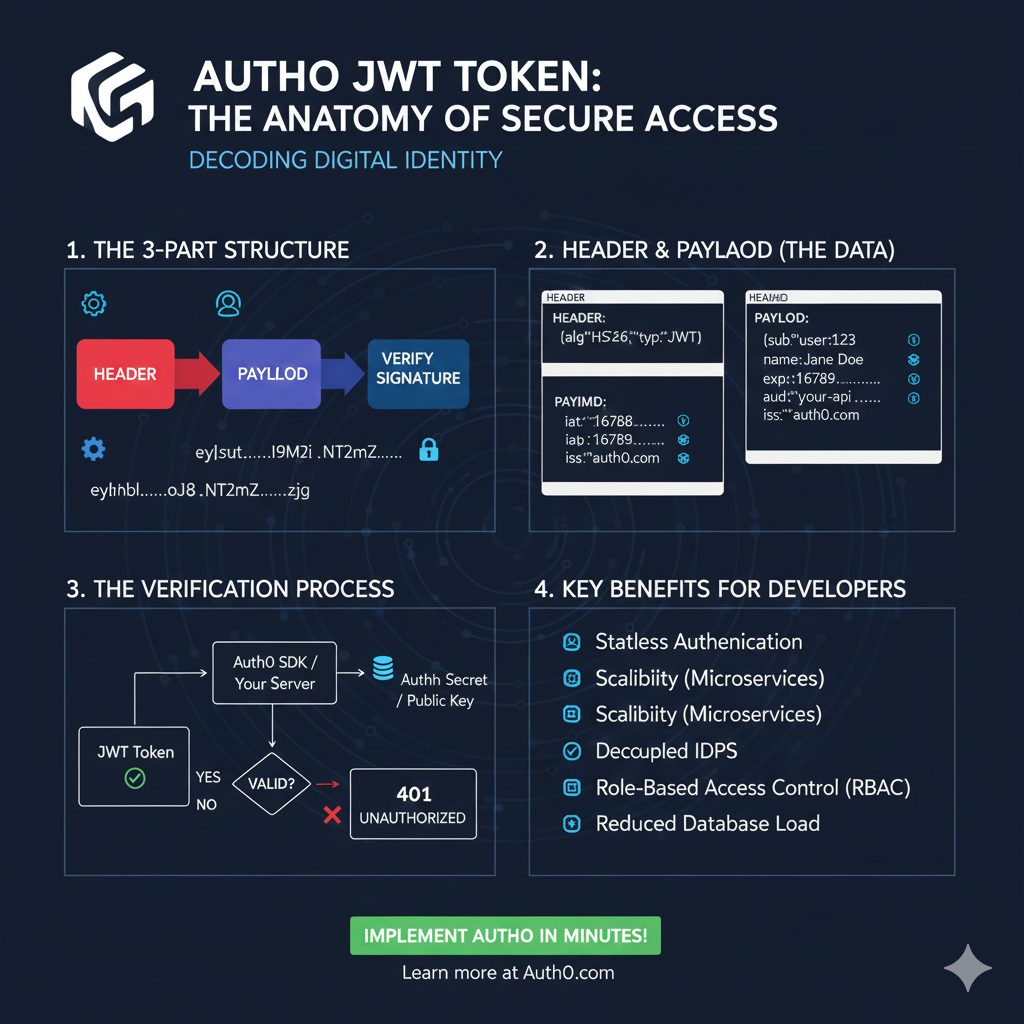
Auth0 JWT Token: Anatomy of Secure Access
This infographic details the structure, usage, and benefits of a JWT, focusing on how it provides secure and stateless access.
1. The 3-Part Structure 🧩
A JWT is composed of three base64-encoded parts, separated by dots, which are used to verify the token’s integrity.
- Header (Red): The first part, containing the token type (
typ: JWT) and the signing algorithm (e.g.,alg: HS256). - Payload (Blue): The middle part, containing the data claims (user ID, expiration, roles, etc.).
- Signature: The cryptographic hash used to Verify Signature. The entire token is represented as
eyhhbl.....oj8.NT2Mz.....zjg.
2. Header & Payload (The Data) 🔑
This section provides a closer look at the key-value pairs stored within the first two parts of the token.
| Part | Claim Key | Example Value & Description |
| HEADER | alg, typ | alg: HS256 and typ: JWT |
| PAYLOAD | sub | Subject/User ID (e.g., user:123) |
| PAYLOAD | name | User’s Name (e.g., Jane Doe) |
| PAYLOAD | exp | Expiration Time (e.g., 16789...) |
| PAYLOAD | iss, aud | Issuer (auth0.com) and Audience (your-api) |
3. The Verification Process ✅
This flowchart explains the server-side process for determining if an incoming token is trustworthy.
- JWT Token Received: An incoming token is submitted to the server.
- Verification: The token is passed through the Auth0 SDK / Your Server.
- Key Check: The server uses the Auth Secret / Public Key to check the signature.
- Result:
- VALID: Access is granted.
- INVALID: If the signature is incorrect or the token is expired, the server returns a 401 UNAUTHORIZED error.
4. Key Benefits for Developers ✨
Using JWTs provides several architectural advantages for API development.
- Stateless Authentication.
- Scalability (especially for Microservices).
- Decoupled IDPS (Identity Providers).
- Role-Based Access Control (RBAC).
- Reduced Database Load.
learn for more knowledge
Json Parser ->WHAT IS API JSON Parser – JSON Parser API – JSON.parse – json parse
Mykeywordrank ->SEO Ranking Checker -Keyword Rank Checker – keyword rank checker
Json Compare ->JSONCompare: The Ultimate JSON Compare Tool – online json comparator
Fake Json –>What is Dummy JSON Data- Free Fake Rest Api JSON Data – fake api
Leave a Reply