Introduction: The Role of jwt authentication in aws
In today’s cloud-native world, securing your api and web applications is paramount. A json web token (jwt) has emerged as a powerful, compact, and self-contained way to transmit identity information securely between parties. When leveraging an aws jwt within the Amazon Web Services ecosystem, understanding the right service patterns is crucial. This guide will walk you through how to effectively create, use, and verify a jwt token to enhance your application’s security posture.
What Exactly is a json web token (jwt)?
A json web token is an open standard (RFC 7519) that defines a compact and URL-safe way for securely transmitting information. This jwt token can be verified and trusted because it is digitally signed. Every jwt consists of three parts:
- Header: Contains the type of token and the signing algorithm.
- Payload: Contains the claims—statements about a user and additional data. Standard claims ensure a valid payload is transmitted (e.g.,
iss,exp,sub). - Signature: Created using a jwk (JSON Web Key) or secret to ensure the payload hasn’t been tampered with.
Why Use jwt token Integration with aws?
Integrating jwt authentication into your aws architecture offers several compelling advantages:
- Stateless Authentication: An access token carries all necessary user info, reducing server-side session storage.
- Decoupled Security: Frontends and microservices use the same jwt, issued by a central identity provider like a Cognito user pool.
- Fine-Grained Access: Claims within a jwt allow an aws service to make authorization decisions.
Key aws Services for jwt Integration
Several aws services play a vital role when you create and verify tokens:
- AWS Cognito: Acts as the primary identity provider. It uses a user pool to issue an access token or ID token.
- Amazon API Gateway: The gateway for exposing your api. It can directly verify a jwt using built-in authorizers.
- AWS Lambda: Used for custom jwt authentication logic. An aws lambda function can serve as a jwt verifier to process complex claims.
How to verify and Validate aws jwt in api gateway
The most common way to validate a jwt token is through the api gateway‘s built-in authorizer.
1. Using a Cognito user pool authorizer
If your tokens are issued by a Cognito user pool, the gateway provides direct integration. It will automatically check the signature against the jwks (JSON Web Key Set) to ensure a valid request.
2. Using an OIDC authorizer
For a jwt issued by other providers, you can use the jwt type authorizer. Provide the “Issuer URL” and “Audience” to allow the gateway to verify the token signature against the provider’s jwks endpoint.
3. Advanced Validation with aws lambda and jwt verifier
When you need custom logic, use an aws lambda function. You can use the aws-jwt-verify library to create a sophisticated jwt verifier.
JavaScript
// Example using a Lambda JWT Verifier
const { CognitoJwtVerifier } = require("aws-jwt-verify");

// cognitojwtverifier create: highly efficient with jwks cache
const verifier = CognitoJwtVerifier.create({
  userPoolId: "us-east-1_example",
  tokenUse: "access",
  clientId: "example-client-id",
});

exports.handler = async (event) => {
  const token = event.headers.authorization;

  try {
    // jwtverifier create logic handles the verify process
    const payload = await verifier.verify(token);
    console.log("Token is valid. Payload:", payload);
    return { isAuthorized: true, context: { user: payload.sub } };
  } catch {
    console.log("Token invalid");
    return { isAuthorized: false };
  }
};
Using cognitojwtverifier create is a best practice because it manages the jwks cache automatically, meaning your lambda doesn’t have to fetch the jwk on every single request, significantly improving api performance.
Best Practices for aws jwt Security
- Always verify Tokens: Never trust a jwt without checking the signature and valid payload.
- Use jwks cache: When using aws lambda, ensure your jwt verifier uses a jwks cache to avoid unnecessary network calls to the identity provider.
- Secure jwk Management: Ensure your jwks endpoint is trusted and use aws tools to rotate keys.
- Short-Lived access token: Use short expiration times to minimize the risk of a compromised jwt token.
Conclusion
Mastering aws jwt integration provides a robust and scalable approach to securing your api. By leveraging a Cognito user pool for identity, api gateway for efficient jwt authentication, and aws lambda for custom jwt verifier scenarios, you can build a highly secure service. Implement these strategies today to ensure every access token is valid and your cloud-native applications remain protected.
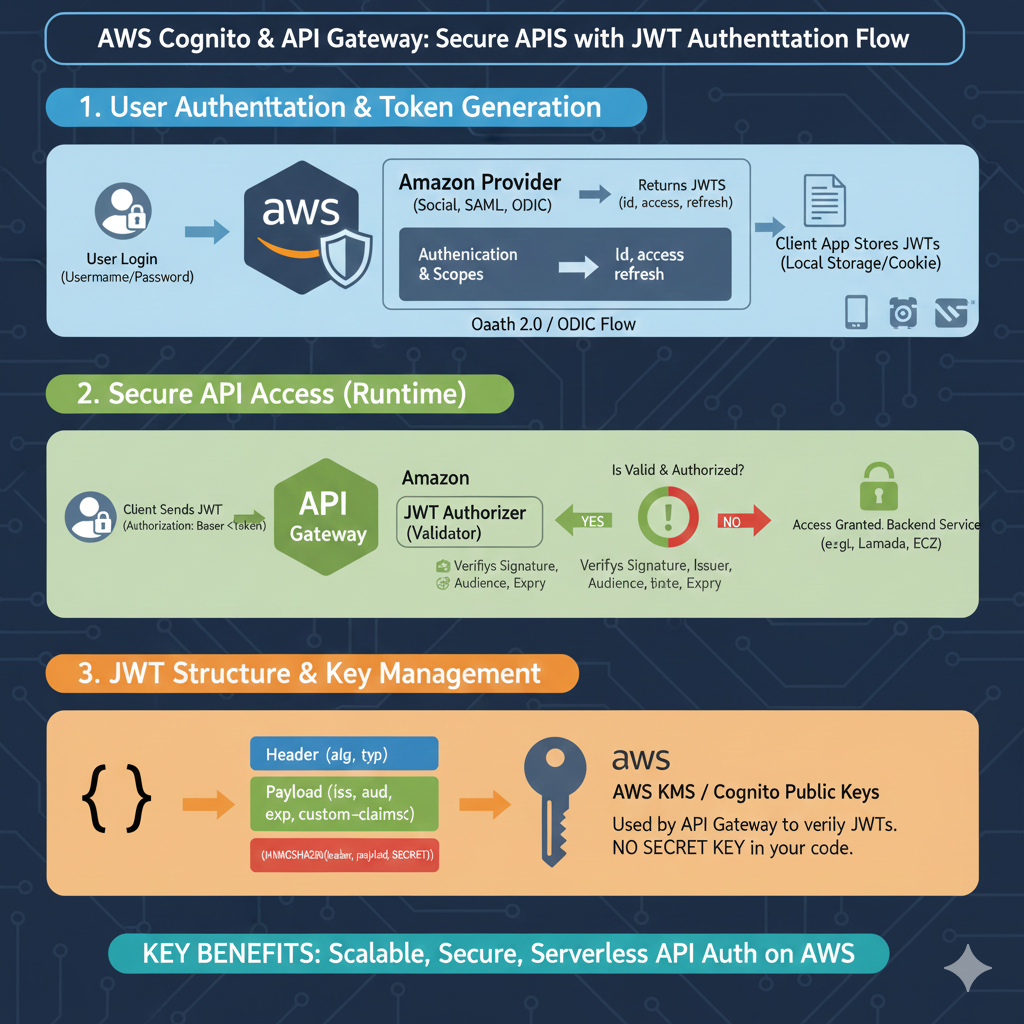
AWS JWT Authentication Strategy
The process is divided into three critical phases: user entry, runtime security, and structural management.
1. User Authentication & Token Generation
This stage focuses on how a user initially identifies themselves to the AWS environment:
- Initial Login: A user submits credentials (Username/Password) to start the session.
- Identity Providers: AWS integrates with various Amazon Providers, including Social logins, SAML, or OIDC.
- OAuth 2.0 Flow: The system processes authentication and scopes via an OAuth 2.0 / OIDC flow.
- Token Delivery: Upon successful verification, AWS returns a set of JWTs, including ID, Access, and Refresh tokens.
- Client Storage: The client application safely stores these tokens in Local Storage or a Cookie for future requests.
2. Secure API Access (Runtime)
This phase explains how the tokens are used to protect backend resources during active use:
- Authorized Request: The client sends the JWT in the
Authorization: Bearer <token>header. - API Gateway Interception: The request is received by the AWS API Gateway.
- JWT Authorizer: A dedicated validator checks the token’s Signature, Issuer, Audience, and Expiration (exp).
- Access Decision:
- YES: Access is granted to backend services like AWS Lambda or EC2.
- NO: The request is rejected if the token is invalid or unauthorized.
3. JWT Structure & Key Management
This section covers the technical makeup of the token and how AWS maintains security without manual keys:
- Standard Structure: The token includes a Header (alg, typ), a Payload (claims like
iss,aud,exp), and a Signature. - AWS KMS / Cognito Public Keys: AWS manages the public keys used by the API Gateway to verify token signatures.
- Code Security: A major advantage is that there is NO SECRET KEY required within your application code.
learn for more knowledge
Json parser-> How to Parse JSON in Go (Golang JSON Parser Tutorial) – json parse
Mykeywordrank-> Keyword SEO-Master Keyword Research and Discover the Best SEO Keywords with a Free Keyword Tool – keyword rank checker
Json Compare ->How to Compare Two JSONs Online: Your Ultimate Guide – online json comparator
Fake Json –>How to Create Dummy API Responses for Seamless Development and Testing – fake api
Leave a Reply