Introduction to JSON Web Tokens (JWT)
In the world of modern web development and API security, JSON Web Tokens (JWTs) have become an indispensable tool. If you’ve ever wondered how applications securely handle user authentication without relying on session cookies, then a deep dive into understand jwt is crucial. This guide will demystify the web token, breaking down the jwt structure, how web tokens work, and essential security practices.
A json web token is an open standard (RFC 7519) that defines a compact and self-contained way for securely transmitting data and identity between parties as a json object. This information can be verified because of the token signature.
- Compact: Because of their small size, jwts can be sent through a URL or an HTTP header.
- Self-contained: The payload contains all necessary data, avoiding multiple database queries.
- Secure: They use a secret key or a public/private key pair for high-level auth.
JWT Structure: Understanding the Header Payload and Signature
To truly understand jwt, you must look at the three parts of a jwt token separated by dots (.): header.payload.signature.
1. The Header
The header typically consists of the token type and the hashing algorithm being used (like HMAC SHA256). This json web metadata is the first part of the jwt structure.
2. The JWT Claim and Payload
The payload contains the jwt claims—statements about an entity (typically the user). When you decode jwts, you will find three types of jwt claims:
- Registered Claims: Predefined claims like
iss(issuer) andexp(expiration). - Public Claims: User-defined but collision-resistant.
- Private Claims: Custom data shared between parties.
3. Token Signature
The signature is used to verify that the json web tokens haven’t been tampered with. It is created by taking the header payload, a secret key, and the algorithm to create a unique hash.
HMACSHA256(base64UrlEncode(header) base64UrlEncode(payload), secret)
JWT Authentication: How Access Tokens Work in Practice
Let’s walk through a typical login and auth flow using json web tokens:
- Login: The user sends credentials to the authentication server.
- Generate Tokens: The server verifies the identity. If valid, it creates a jwt token and signs it with a secret key.
- Client Stores Token: The client stores the access tokens in local storage or a cookie.
- Subsequent Requests: For every request, the client includes the jwt in the Authorization header using the
Bearerschema. - Server Verification: The server performs jwt decoding to verify the token signature. If the key matches, access is granted.
JWT Decoding and Security Best Practices
While jwts are powerful, they require careful implementation. Since jwt decoding is possible by anyone who has the token (it is only encoded, not encrypted), you must follow these rules:
- Protect the Secret Key: Your signature is only as secure as the key used to sign it.
- Use HTTPS: Prevent interception of your web tokens.
- Short Expiration: Set short
exptimes for access tokens and use a refresh token strategy for long-lived sessions. - No Sensitive Data: Never put passwords or private identity info in the payload.
- Validate All JWT Claims: Upon decoding, always check the issuer, audience, and expiration.
Conclusion
Understand jwt is a fundamental skill for the modern developer. By leveraging the jwt structure, proper jwt authentication flows, and strong token signature practices, you can build scalable, session-less applications. Whether you are using tokens for simple identity or complex microservices, json web tokens provide the flexibility and security required for today’s web.
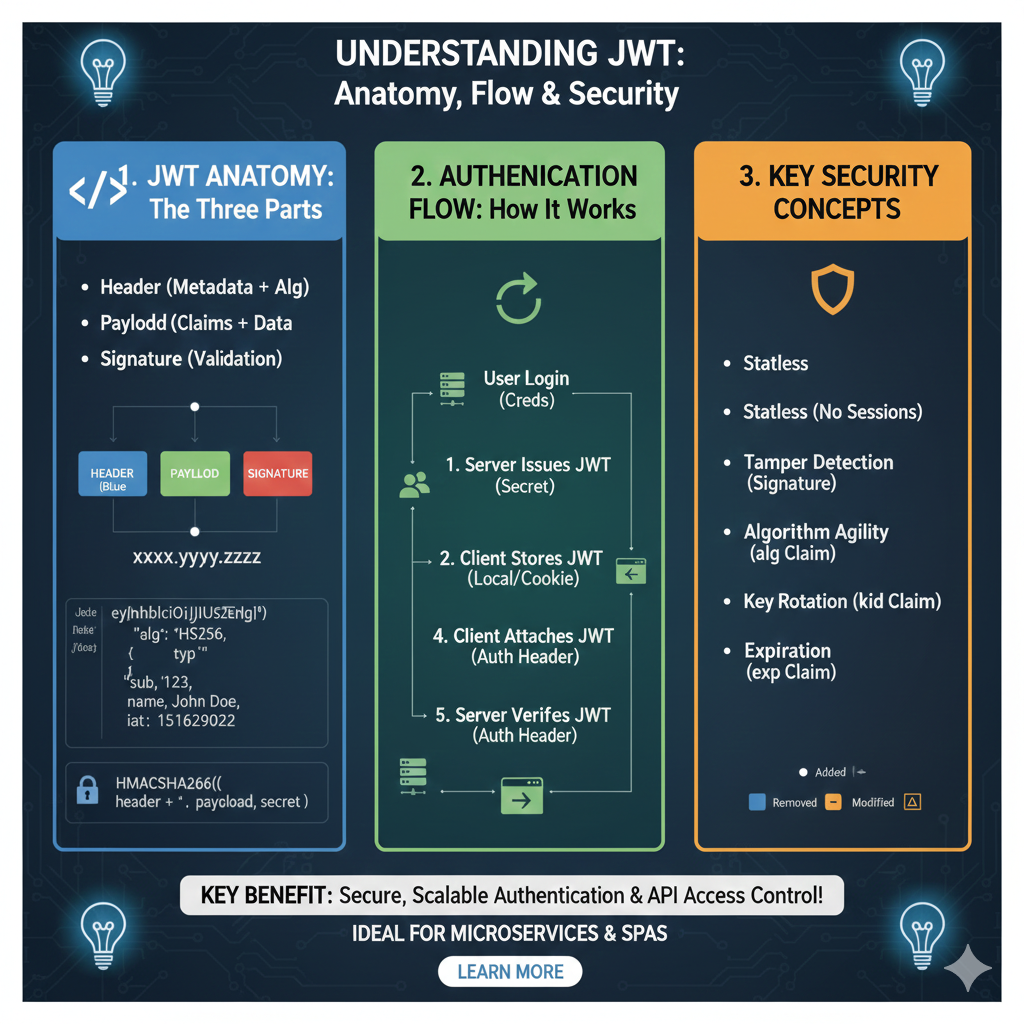
The Core Framework of JWT
The graphic breaks down the token lifecycle into three distinct educational modules:
1. JWT Anatomy: The Three Parts (Blue)
This section explains the physical structure of a token, often represented as xxxx.yyyy.zzzz:
- Header: Contains metadata, including the token type and the signing Algorithm (e.g., HS256).
- Payload: Stores the Claims and user data, such as the subject (
sub), user name, and issued-at time (iat). - Signature: Created by hashing the encoded header and payload with a secret key to provide Validation.
2. Authentication Flow: How It Works (Green)
This module illustrates the five-step communication process between the client and server:
- User Login: The user sends credentials to the server.
- Server Issues JWT: The server validates credentials and generates a signed token using a secret.
- Client Stores JWT: The token is saved locally by the client in a cookie or local storage.
- Client Attaches JWT: For subsequent requests, the client includes the token in the Auth Header.
- Server Verifies JWT: The server checks the signature to grant access without needing to query the database for every request.
3. Key Security Concepts (Orange)
This section highlights the technical advantages and security features of using JWTs:
- Statelessness: No sessions are required on the server, making it ideal for microservices.
- Tamper Detection: The Signature ensures that any change to the header or payload by an unauthorized party is immediately detected.
- Algorithm Agility: The
algclaim allows for flexible security upgrades. - Key Rotation: The
kidclaim helps manage which key was used for signing during security updates. - Expiration: The
expclaim automatically invalidates the token after a set time to limit risk.
learn for more knowledge
Mykeywordrank-> SEO Search Optimization-Mastering Search Engine Optimization for Unbeatable Google Rankings – keyword rank checker
json parser->How to json array parser- A Comprehensive Guide for Developers – json parse
Json Compare ->json online compare- The Ultimate Guide to json compare online, json diff, and compare online tools – online json comparator
Fake Json –>dummy json online- Mastering fake api Testing with json, json dummy data, jsonplaceholder, and mockaroo – fake api
Leave a Reply