A OneSpan Token is a secure authentication device or software app used to verify a user’s identity during login. OneSpan specializes in multi-factor authentication (MFA) and digital security, and the token provides a one-time password (OTP) or digital signature that keeps accounts safe. This technology provides secure access for millions of users.
In simple words:
👉 OneSpan Token = A security code generator used for safe logins and strong user authentication.
Why OneSpan Tokens and Factor Authentication Are Used
OneSpan Tokens add an extra layer of security—often referred to as a second factor authentication—for:
- Banking logins and financial transactions.
- Corporate systems and secure access to $\text{VPNs}$.
- Government portals.
- Secure mobile apps and high-risk solutions.
Even if a user’s passwords are stolen, the attacker cannot log in without the token, making these solutions vital for comprehensive security.
Note: While both are tokens, the OneSpan Token should not be confused with the JSON Web Token (JWT), which is a digital standard for transmitting information securely between parties.
Types of OneSpan Tokens: Hardware and Software Authentication
OneSpan provides various types of tokens to suit different security and user needs:
1. Hardware Tokens (DIGIPASS Tokens)
These are small physical devices that display a one-time password (OTP) code. The classic examples include the DIGIPASS one-button authenticators which simplify the user experience by requiring just one press to generate a code. These are physical tokens that work completely offline.
2. Software Tokens (Soft Token / Token App)
These are mobile apps like:
- OneSpan Mobile Authenticator
- OneSpan DIGIPASS
These applications perform software authentication by generating the OTP on your phone. This approach is cost-effective and convenient, turning the user’s mobile device into a soft token.
3. Push Authentication Tokens
A notification is sent to your phone, and you simply tap approve or reject the login attempt. This method often forms the basis for modern passwordless user authentication solutions.
How a OneSpan Token Works (One-Time Password)
The mechanism behind the OneSpan Token is the generation of a time-based or event-based OTP:
- User enters username & passwords.
- OneSpan token generates a 6-digit or 8-digit one-time password (OTP).
- User enters the code into the system.
- The system verifies the code’s validity.
- Secure access login is complete.
The codes change every 30–60 seconds, which is why they are extremely secure. The OneSpan ecosystem also supports advanced functions like $\text{eSignature}$ (digital signature).
Benefits of OneSpan Tokens
Using DIGIPASS tokens and other OneSpan authentication solutions provides:
- ✔ Strong protection against hacking and unauthorized access.
- ✔ Prevents unauthorized access and ensures secure access.
- ✔ Works offline (especially the hardware tokens).
- ✔ Easy to use (one-button authenticators).
- ✔ Essential for high-risk industries like banking and finance.
- ✔ Supports robust multifactor authentication (MFA).
Conclusion
A OneSpan Token is a critical security tool that generates one-time passwords or digital signatures to protect user authentication. It is widely adopted in banking and enterprise systems to ensure safe and verified logins, providing superior security through multiple factor authentication methods like software authentication and the convenient DIGIPASS one-button authenticators.
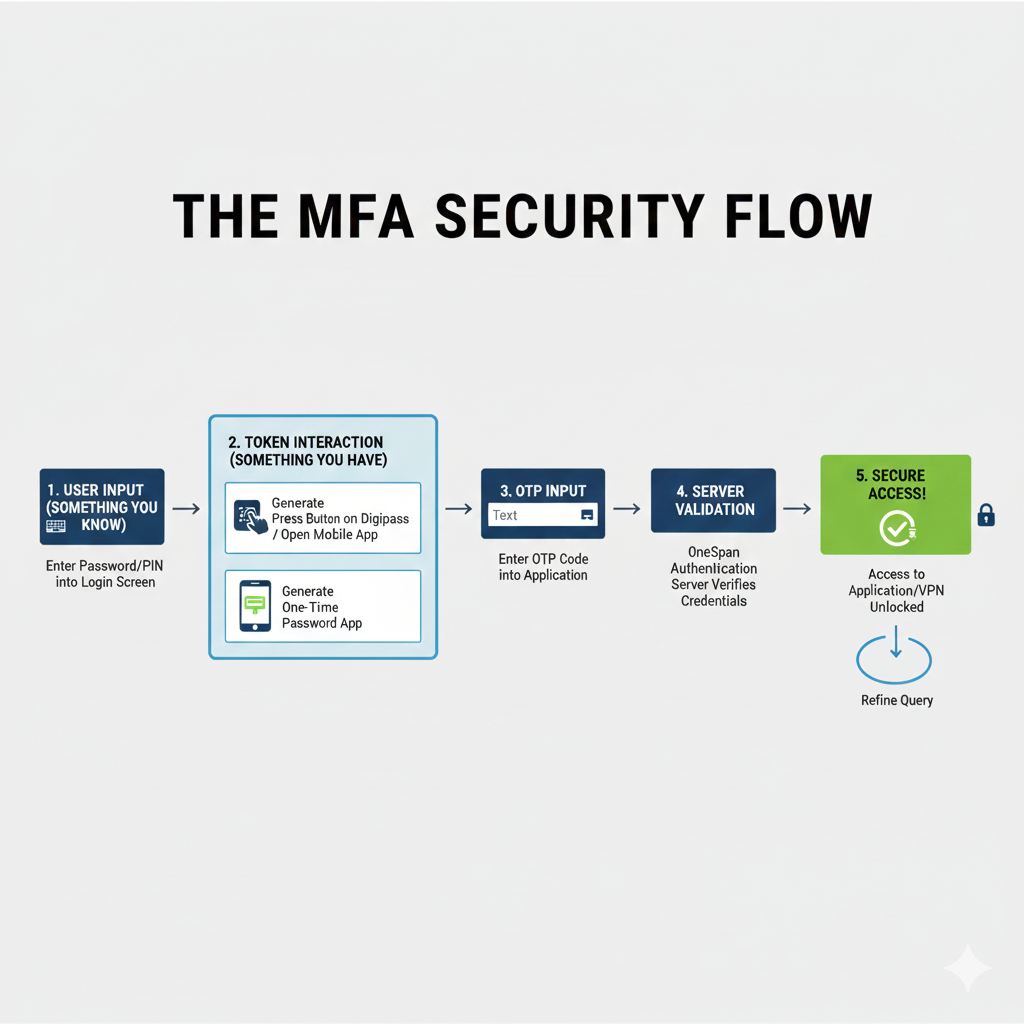
“THE MFA SECURITY FLOW” Infographic
This flowchart illustrates the step-by-step process of securing access using a OneSpan Digipass hardware token or a Mobile Authenticator application, combining the factors of “Something you Know” and “Something you Have.”
Title: THE MFA SECURITY FLOW
| Step | Title & Factor | Action |
| 1 | USER INPUT (SOMETHING YOU KNOW) | Enter Password/PIN into the Login Screen. |
| 2 | TOKEN INTERACTION (SOMETHING YOU HAVE) | Generate the OTP by pressing the button on the Digipass / opening the Open Mobile App or One-Time Password App. |
| 3 | OTP INPUT | Enter the generated OTP Code into the Application’s login field. |
| 4 | SERVER VALIDATION | The OneSpan Authentication Server verifies the entered Credentials (Password/PIN + OTP). |
| 5 | SECURE ACCESS! | Access to the Application/VPN is Unlocked, granting the user entry. |
- Refinement Loop: A circular arrow labeled “Refine Query” suggests the user may need to re-attempt the login if validation fails.
Leave a Reply