Blog

  • What is protegrity tokenization, data protection, tokenization, vaultless tokenization

    Protegrity Tokenization is a powerful data protection method designed to keep sensitive data secure while still allowing organizations to use it safely across apps, analytics systems, cloud platforms, and enterprise workflows. This tokenization technology replaces confidential information with non-sensitive tokens that maintain format but do not reveal the original value. With support for encryption alternatives, vaultless tokenization, compliance features, and secure architecture, Protegrity has become a trusted solution for companies that need advanced data security.

    What Is Protegrity Tokenization?

    Protegrity tokenization is a data protection technique that substitutes sensitive information with structured tokens. These tokens look like the original data but carry no exploitable value. Because it supports data privacy, pci dss requirements, cloud platforms, and secure data processing, organizations rely on Protegrity to manage protected data across their systems. The tokenized output can travel through applications without exposing sensitive information, making it ideal for compliance-heavy industries.

    How Protegrity Tokenization Works

    Understanding Sensitive Data Protection with Tokenization

    When applications send sensitive data—such as card numbers, healthcare records, or personal details—Protegrity’s tokenization engine converts the information into a secure token. This token can be stored, shared, processed, or transmitted without risking unauthorized access to the original data.

    The process involves:

    • Application sends sensitive data
    • Protegrity tokenization engine transforms it into a token
    • Mapping between token and original value is stored in the Protegrity vault
    • Only authorized systems can detokenize

    Example of Tokenization

    Original data: 4567-1234-9876-5432
    Tokenized data: 9821-5500-1299-4400

    This secure approach ensures data privacy and prevents exposure during data sharing, cloud migration, and analytics.

    Why Companies Use Protegrity Tokenization

    Enhanced Data Protection for Sensitive Information

    Businesses use Protegrity tokenization to protect PII, PCI, PHI, and other regulated data categories. The method keeps protected data secure in databases, apps, and cloud environments, making it harder for attackers to misuse stolen information.

    Strong Security and Compliance

    Protegrity supports key data security regulations:

    • PCI DSS
    • GDPR
    • HIPAA
    • CCPA

    Since tokens do not contain actual sensitive data, they reduce compliance scope and overall security risks.

    Lower Breach Impact

    Even if encrypted data or tokenized data is exposed, unauthorized users cannot reverse Protegrity tokenization without access to the secure detokenization service or vault.

    Maintains Application Compatibility

    Tokens mimic the original format, so applications, APIs, and cloud services can process them without major redesign. This makes tokenization suitable for legacy systems and modern cloud apps including AWS, Snowflake, and other protegrity cloud environments.

    Protegrity Tokenization vs Encryption

    Key Differences in Data Security

    Tokenization and encryption both protect sensitive data, but they behave differently.

    Feature | Tokenization | Encryption
    Can original data be reversed? | Only with Protegrity detokenization | Yes, with keys
    Format similar to original? | Yes | No
    Use cases | Payment cards, PII, cloud data sharing | General encrypted data
    Key management | Minimal | Requires strong key management

    Tokenization is preferred when secure data needs to remain usable across applications.

    Types of Protegrity Tokenization

    Vault-Based Tokenization

    This method stores the mapping between real data and tokens in a centralized secure vault. It strengthens data protection for highly sensitive information.

    protegrity vaultless tokenization (Vaultless Tokenization)

    Vaultless tokenization eliminates the need for a central vault. Instead, vaultless tokenization uses Protegrity algorithms to generate tokens on demand. This approach is faster, more scalable, and cloud-friendly—ideal for distributed systems, APIs, and modern data architectures.

    Where Protegrity Tokenization Is Used

    Data Privacy and Secure Data Across Industries

    Protegrity tokenization is widely adopted by:

    • Banks and financial institutions
    • E-commerce systems
    • Healthcare platforms protecting PHI
    • Cloud data warehouses (Snowflake, BigQuery, Redshift)
    • Insurance systems
    • Enterprise data lakes
    • Organizations using protegrity api for data sharing

    These industries rely on Protegrity tokenization to maintain compliance, reduce risk, and secure sensitive information at scale.

    Benefits of Protegrity Tokenization

    Protegrity tokenization offers multiple advantages:

    • Protects sensitive data across databases, apps, cloud storage, and enterprise systems
    • Reduces risk during breaches and unauthorized access
    • Lowers compliance costs
    • Supports structured and unstructured data
    • Integrates with big data systems, Hadoop, cloud services, and enterprise platforms
    • Enables secure data sharing across teams, APIs, and services

    Conclusion

    Protegrity tokenization provides a highly effective approach to data protection, helping enterprises safeguard sensitive information while supporting analytics, cloud adoption, and secure data sharing. With flexible tokenization methods, including vaultless tokenization, compliance support, and strong data security features, Protegrity remains a leading solution for protecting data across modern digital ecosystems. Whether you process financial information, healthcare data, or cloud-based workloads, Protegrity tokenization ensures your sensitive data stays private, secure, and fully protected.

  • What Is JSON Web Token (JWT)? – Complete Beginner-Friendly Explanation

    A JSON Web Token (JWT) is a secure, compact, and digitally signed token used to verify user identity and safely transfer information between a client and a server. A JSON Web Token is one of the most popular authentication standards in modern applications because it is lightweight, scalable, and easy to implement across web, mobile, and API platforms.


    What Is JSON Web Token (JWT)?

    A JSON Web Token (often called a JWT token) is a digitally signed token that contains encoded user data. It is commonly used for JWT authentication, authorization, and secure data exchange. JWT tokens follow the IETF standard and include claims, a header, a payload, and a signature.

    Developers use JWTs to allow servers to verify users without storing session data, making authentication fast and efficient.


    Why JSON Web Token Is Used

    JSON Web Tokens are used because they are:

    • Fast
    • Scalable
    • Lightweight
    • Stateless
    • Secure
    • Cross-platform

    JWT authentication makes it easy to authenticate users across different applications, servers, and microservices. This is why JWT tokens are widely used in authorization, API security, and application login systems.


    How JSON Web Tokens Work

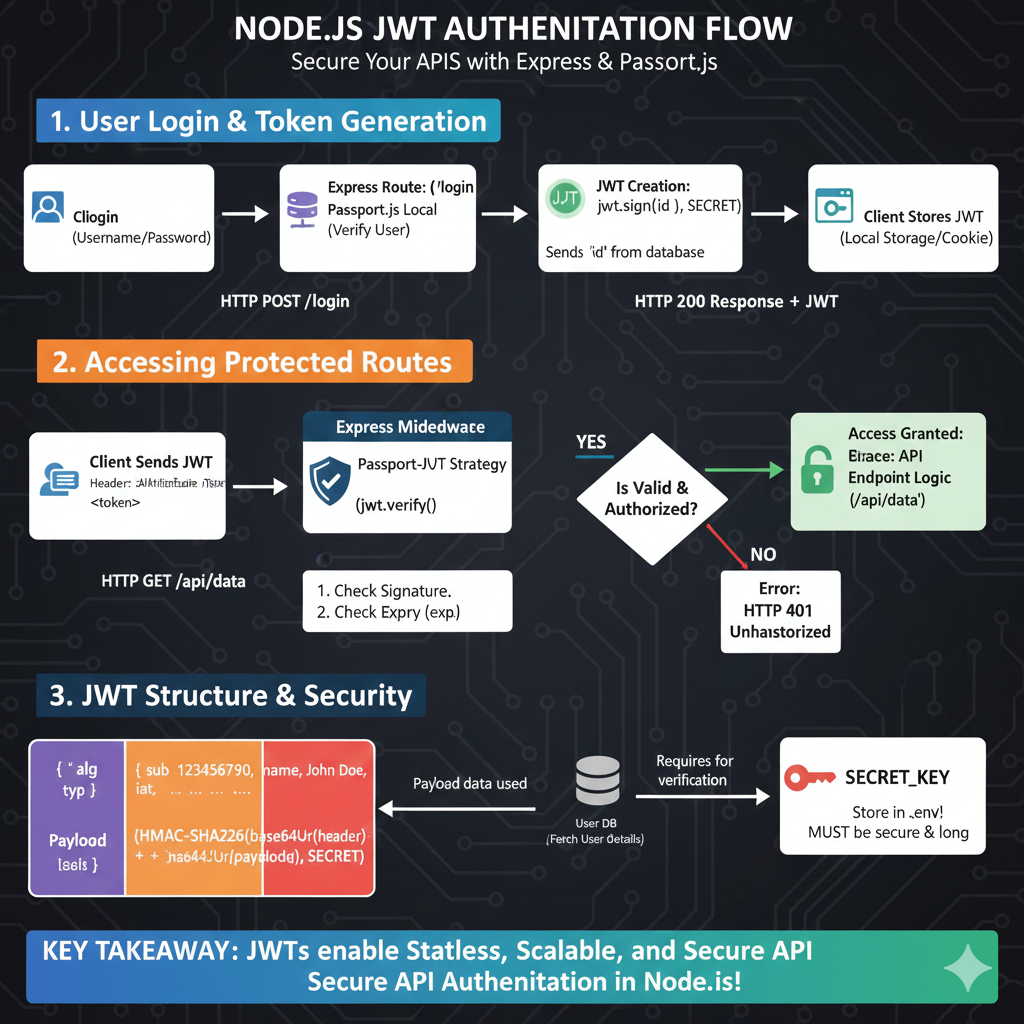
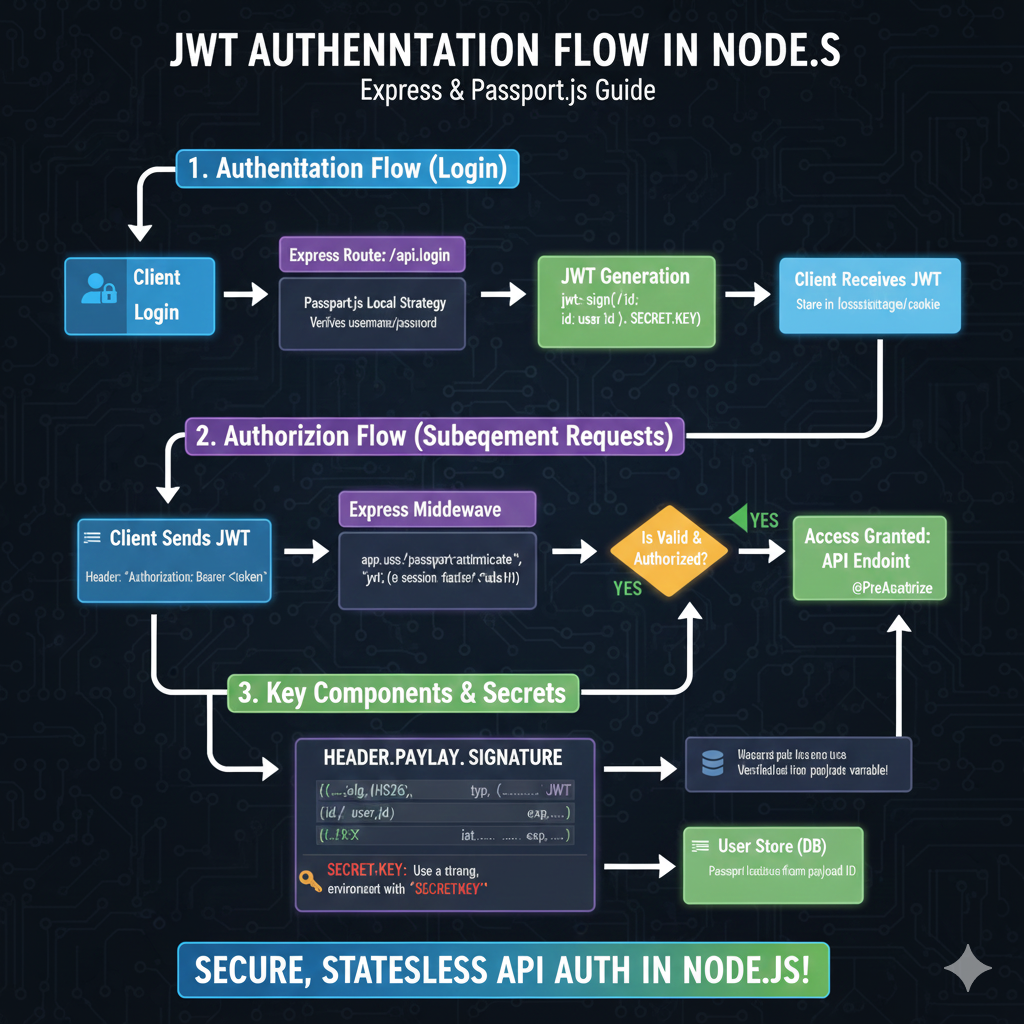
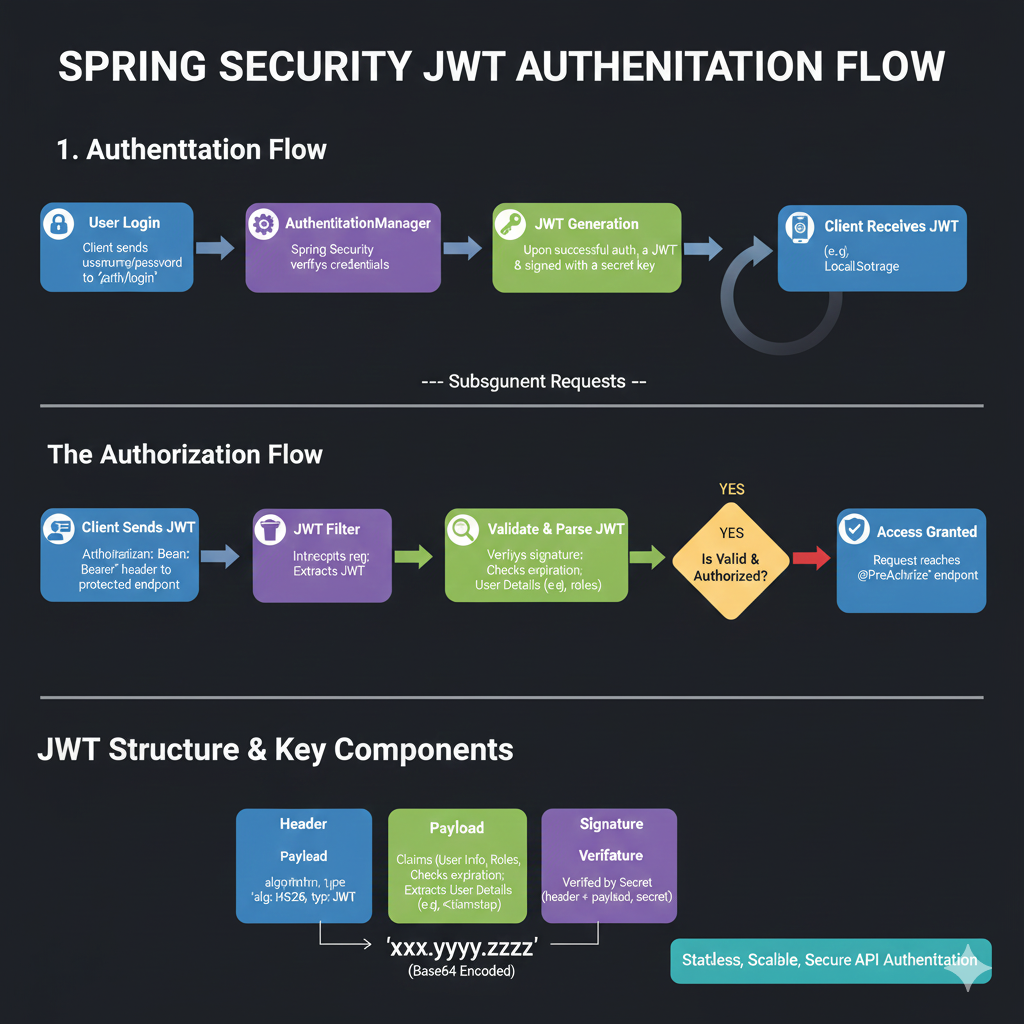
    Here is the typical flow of a JWT token:

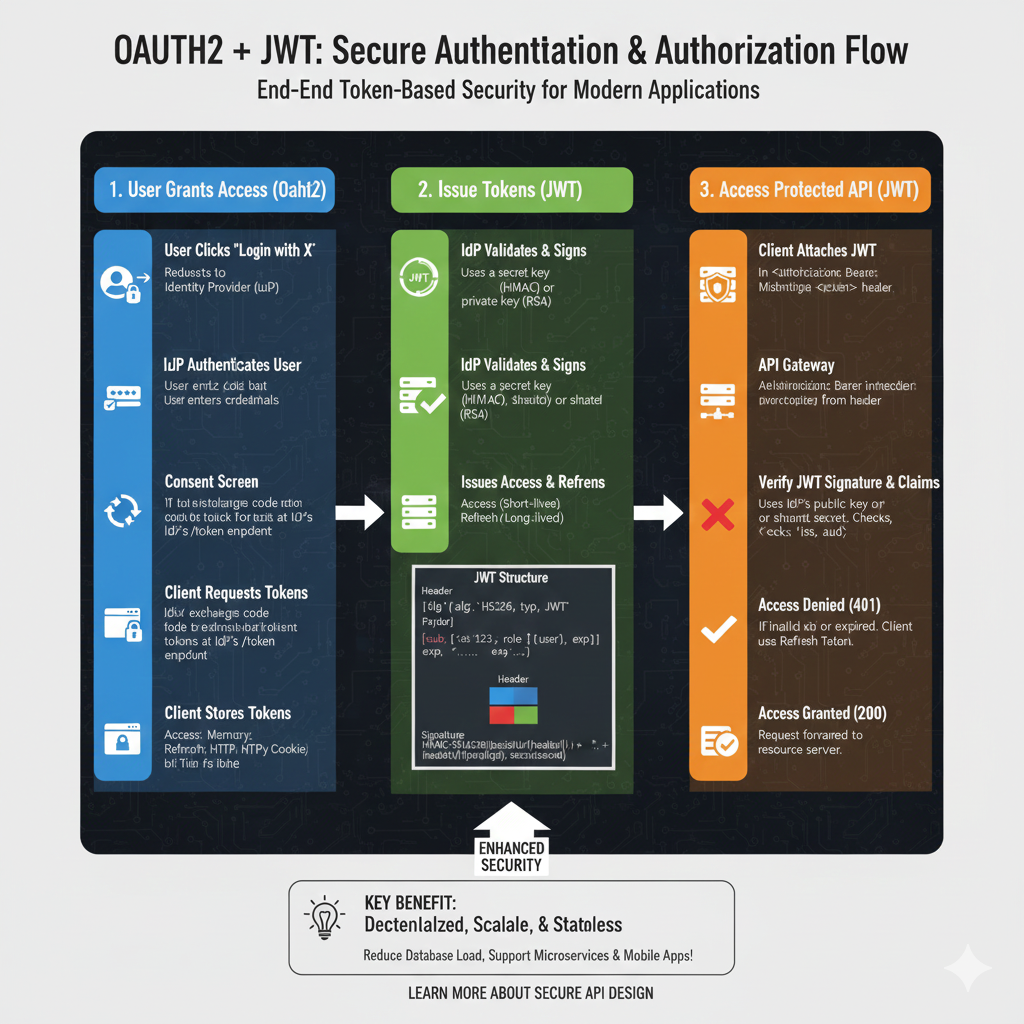
    1. User logs in with username and password
    2. Server verifies credentials
    3. Server generates a JWT using jwt sign
    4. Client stores the encoded JWT token (localStorage, cookies, etc.)
    5. On every request, the client sends the JWT
    6. Server validates using jwt verify
    7. If valid, server grants access

    JWT verification ensures that the token, claims, and signature are valid and not modified.


    Structure of a JSON Web Token

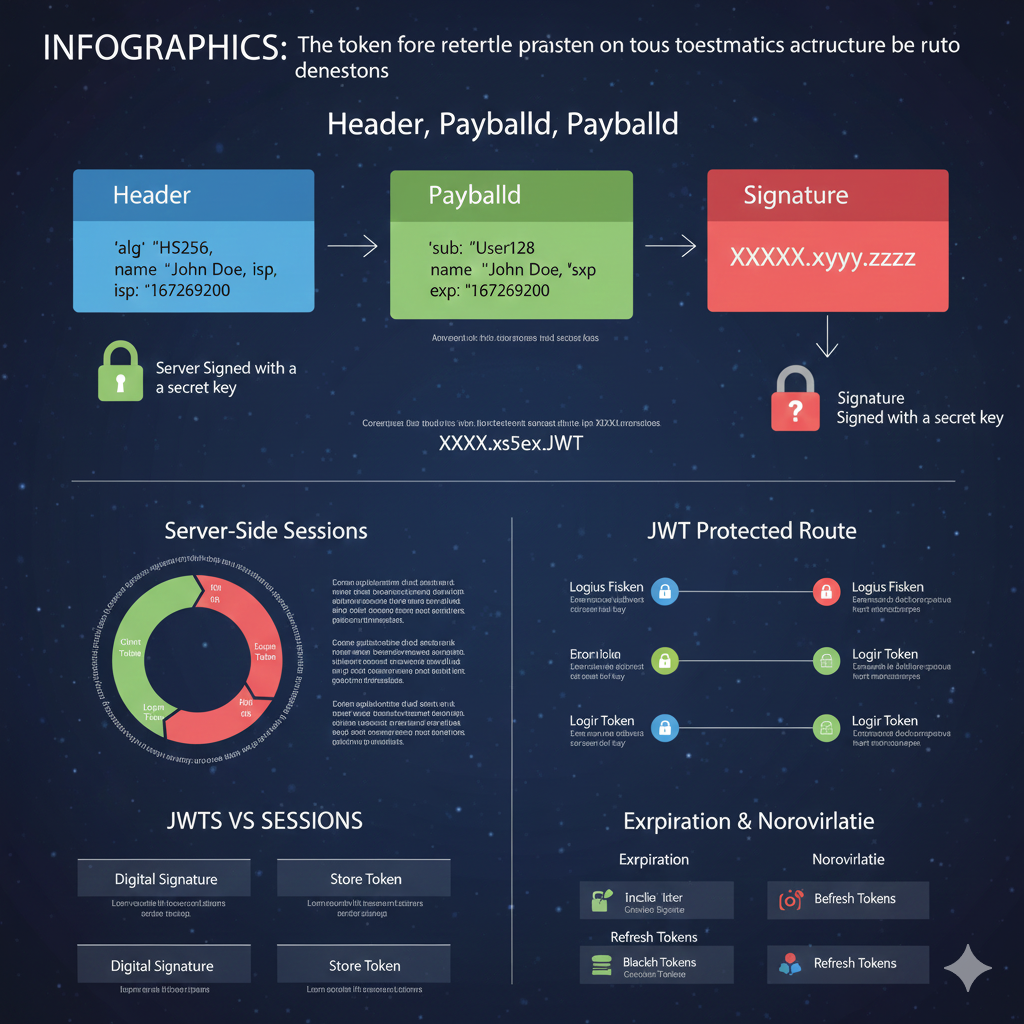
    A JWT consists of three main parts separated by dots:

    header.payload.signature

    Header

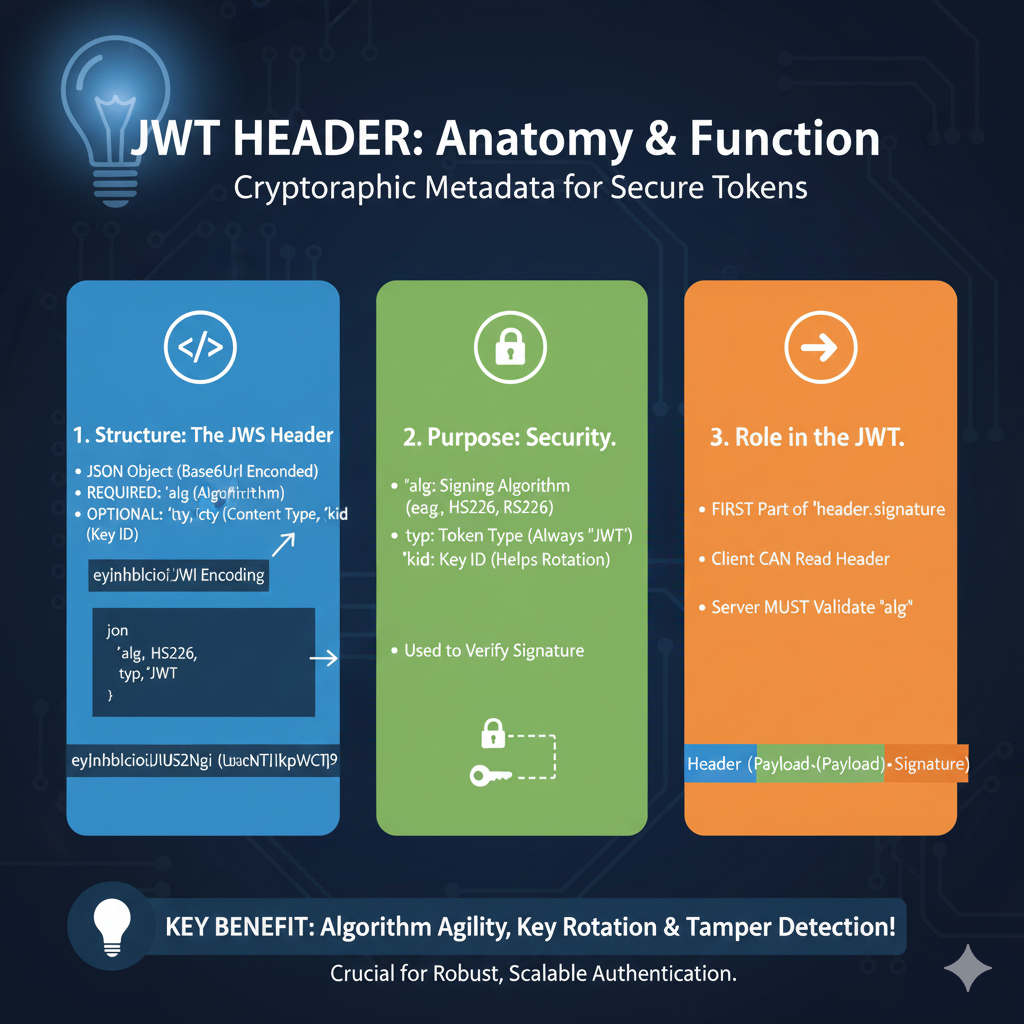
    The header defines the token type (JWT) and the signing algorithm, e.g., HS256.

    Payload

    The payload contains claims, such as:

    • User ID
    • Email
    • Role
    • Expiration time

    These token claims help verify user identity and authorization levels.

    Signature

    The signature ensures the JSON Web Token is signed with a secret or public key and has not been changed. Verification of the signature is essential for JWT security.


    Common Uses of JSON Web Token

    • JWT authentication
    • JWT-based login systems
    • API authorization
    • React, Angular, and Vue SPAs
    • Mobile app security
    • Server-to-server communication
    • Role-based access control

    JWT tokens are extremely useful in microservices and distributed systems because they do not require server-side session storage.


    Advantages of Using JWT Tokens

    • Stateless and scalable
    • Secure, digitally signed
    • Fast verification
    • Works across platforms
    • Easy to encode and decode
    • Ideal for APIs and cloud services

    JWT tokens can be verified using a public key and support encryption standards like JWE.


    Is JSON Web Token Secure?

    A JWT is secure when used correctly. Always follow these practices:

    • Use HTTPS
    • Store tokens safely
    • Use expiration times on tokens
    • Use strong secret keys
    • Rotate keys
    • Implement refresh tokens
    • Validate header, payload, and signature

    JWT verification ensures the signature and claims are authentic.


    Conclusion

    A JSON Web Token (JWT) is a powerful, secure, and efficient way to handle user identity and authorization. Because JWT tokens are lightweight, encoded, and easy to verify, they are widely used in authentication systems across web, mobile, and cloud applications. Understanding JWT structure, token claims, jwt verify, jwt sign, and the overall JWT authentication process is essential for building secure modern applications.

  • What Is JWT Token? (JSON Web Token Explained for Beginners)

    A JWT token (JSON Web Token) is a secure, compact, digitally signed data format used to verify a user’s identity in web applications. A JSON Web Token allows servers to perform JWT authentication without storing session data, making the process fast, scalable, and perfect for modern APIs. Because a JWT is lightweight and encoded, it is widely used across large-scale systems, mobile apps, and cloud-based services.


    What Is a JWT Token? Understanding JSON Web Token and JWT Basics

    A JWT token is essentially a signed piece of data that contains user identity information. A JSON Web Token works as proof that the client requesting access is valid. Since JWT tokens are stateless and do not require server-side sessions, they are ideal for distributed apps, microservices, and identity-based API flows.

    JWT tokens are commonly used in

    • Login authentication
    • Identity verification
    • API access control
    • Mobile applications
    • Single Page Applications (React, Angular, Vue)
    • Microservices communication

    Why Is It Called a Token?

    A token is a small data packet that proves identity or access rights.
    A JWT token serves as verifiable proof that the user is authenticated. The server trusts the client request because the JSON Web Token is signed using a secure key or HMAC algorithm. Since the token is signed, tampering becomes nearly impossible without invalidating the JWT signature.


    How a JWT Token Works

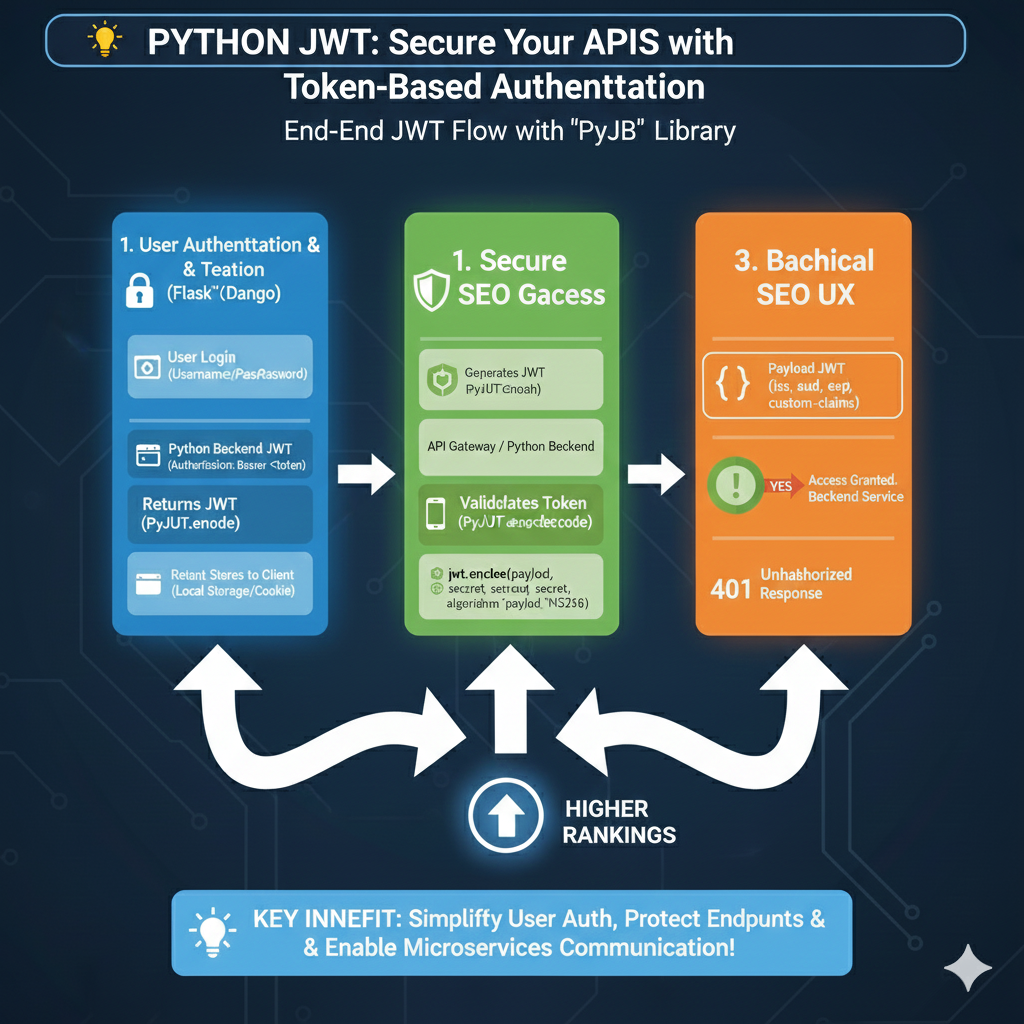
    1. User logs in with username and password
    2. Server verifies credentials
    3. Server creates a signed JWT token
    4. Client stores the token (localStorage, sessionStorage, or cookies)
    5. Client sends the token on every request
    6. Server validates the JWT signature, header, and claims
    7. Access is granted or denied based on token verification

    This JWT authentication flow ensures secure identity and authorization between the client and server.


    JWT Token Structure: Header, Payload, Signature

    A JSON Web Token is made of three encoded sections:

    header.payload.signature

    These three parts form the fundamental token structure in JWT tokens.


    Header (JWT Header)

    The header contains the algorithm and token type.
    It indicates whether the JWT uses HS256 (HMAC) or another signing method. The header plays a key role in how the server performs decoding and signature verification.

    Example:

    {
    “alg”: “HS256”,
    “typ”: “JWT”
    }


    Payload (JWT Payload and Claims)

    The payload carries the user’s data and JWT claims, such as:

    • User ID
    • Email
    • Role
    • Token expiry

    Claims help the server understand identity, role-based access, and authorization rules. The payload is encoded but not encrypted, meaning jwt decoding tools or a JWT debugger can read it.

    Example:

    {
    “id”: 101,
    “email”: “user@example.com“,
    “role”: “admin”,
    “exp”: 1712345678
    }


    Signature (JWT Signature)

    The signature ensures the token has not been modified.
    Using the header, payload, and secret key, the server confirms the signature during verification. If the signature doesn’t match, the JWT is considered invalid.


    Why JWT Token Is Used

    • Stateless authentication
    • Fast and lightweight
    • Digitally signed and secure
    • Ideal for API access and identity verification
    • Works across browsers, servers, and mobile devices

    Because JWT tokens are signed and encoded, they provide strong identity validation with minimal overhead.


    Where JWT Tokens Are Stored

    Common storage locations:

    • localStorage
    • sessionStorage
    • HTTP-only cookies (most secure)

    The choice of storage impacts authorization, user identity management, and protection from token theft.


    Common Use Cases of JWT Tokens

    • User login authentication
    • Securing protected API routes
    • Verifying user identity
    • Role-based authorization
    • Access control in dashboards
    • Microservices communication

    JWTS are widely used in frameworks like Node.js, Django, Laravel, Spring Boot, and modern frontend apps.


    Is JWT Token Secure?

    Yes—when implemented correctly.
    A JSON Web Token is secure if you:

    • Use HTTPS
    • Set token expiration
    • Use strong signing keys
    • Implement refresh tokens
    • Validate signature and authorization rules
    • Avoid storing tokens in insecure places

    Proper JWT verification, decoding, and signature checking ensure high-level authentication and identity protection.


    Conclusion

    A JWT token (JSON Web Token) is a powerful, modern solution for authentication, identity verification, and API authorization. With its secure header, encoded payload, and signed signature, a JWT provides fast, scalable, and flexible authentication across clients, servers, mobile apps, and APIs. Because it is stateless and lightweight, JWT tokens fit perfectly into today’s distributed and cloud-based application environments.

  • What Is JWT? (JSON Web Token Explained)

    A JSON Web Token (JWT) is one of the most widely used technologies for modern authentication and secure data exchange. Developers use JSON Web Tokens to verify user identity, secure API communication, and enable smooth login sessions across web and mobile applications.


    JSON Web Token, JWT Authentication, JWT Token, API Security, JWT, JSON Web Tokens, JWT Verify, JWT Sign, JWT Claim, JSON Web, Web Token

    Why JWT Matters in Modern Web Development

    JSON Web Token technology plays a major role in JWT authentication, where a JWT token is generated after login and used to access protected routes. It enhances API security by allowing servers to verify JWT signatures and ensure the data has not been changed. The payload contains JWT claims, which include user identity, expiration, and permissions. Developers rely on jwt.sign(), jwt.verify(), and various libraries to handle secure signing and verification. This makes JSON Web Tokens ideal for scalable web token-based systems.


    How JWT Ensures Security

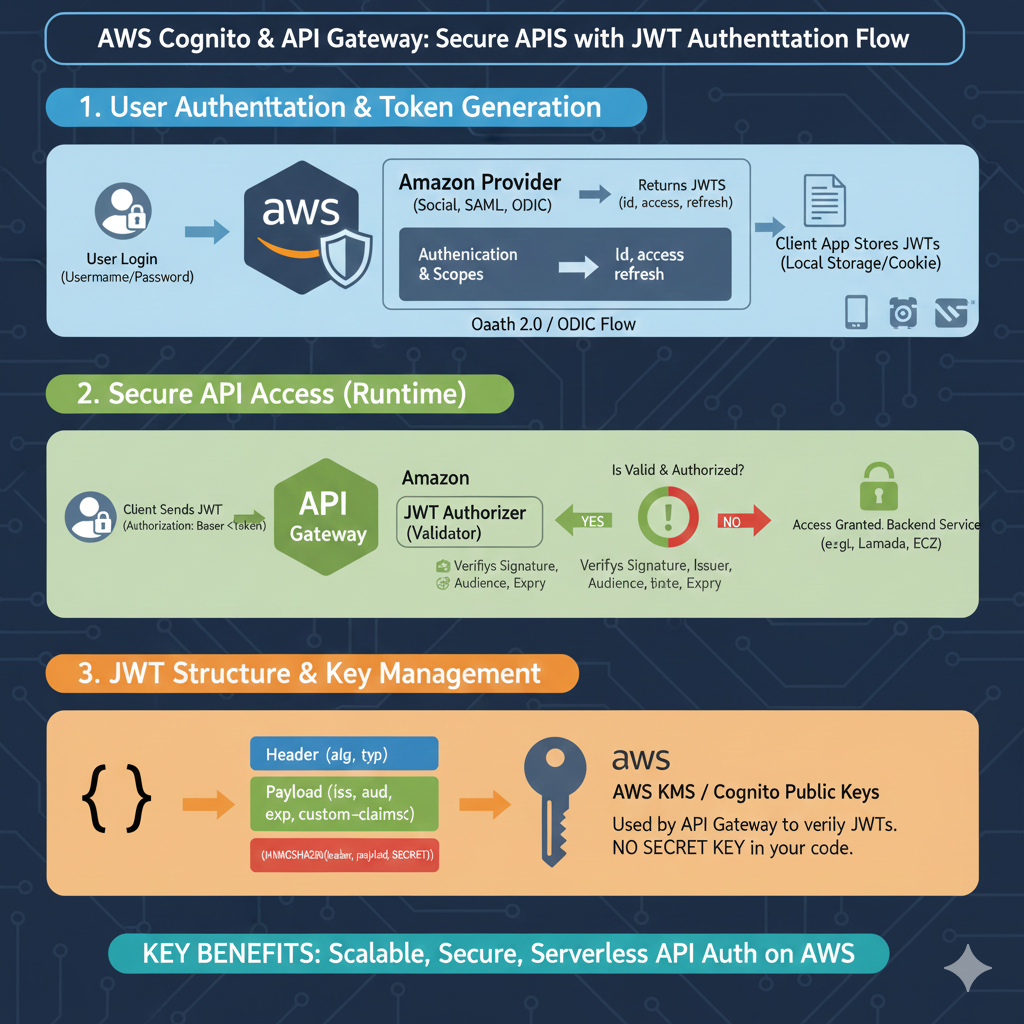
    JWTs are digitally signed using either a public key (RSA, ECDSA) or a secret key (HMAC). This signature ensures that the header, payload, and claims are protected from tampering. When the server receives the token, it performs JWT verify to confirm authenticity.

    Example JWT Structure Recap

    • Header → Token type & algorithm
    • Payload → Claims (id, name, exp)
    • Signature → Cryptographic proof

    Tools and libraries like jwt.sign and jwt.verify are used to encode and decode JWTs in applications. JWT can be used as JWS (signed) or JWE (encrypted) based on security needs.


    SEO-Optimized

    A JSON Web Token is essential for JWT authentication and secure access management in modern applications. A JWT token contains a header, payload, and signature, making it ideal for API security and protecting sensitive data. Developers use JSON Web Tokens for encrypted JWT, token signing, JWT verify, and JWT sign operations with secret keys or public key pairs. During processing, servers handle JWT decoding, validate JWT claims, and ensure the header payload has not been tampered with. Because JWTS follow the IETF standard, they support secure authorization, OAuth, session management, and cross-service communication. JWTs can be signed (JWS) or encrypted (JWE), making them powerful for authentication, security, and access control in any modern web token system.