Blog

  • How to Implement Express JWT for Secure API Authentication

    How to Implement Express JWT for Secure API Authentication

    Securing your API is paramount in modern web development. JSON Web Tokens (JWTs) provide a robust, stateless mechanism for authentication, and when combined with Express.js, the express-jwt middleware simplifies their implementation. This guide will walk you through the process of setting up and using express-jwt to protect your API routes effectively.

    What is JWT?

    JWT, or JSON Web Token, is a compact, URL-safe means of representing claims to be transferred between two parties. The claims in a JWT are encoded as a JSON object that is digitally signed using a secret (with HMAC algorithm) or a public/private key pair using RSA or ECDSA. This signature ensures the integrity of the claims contained within the JWT and verifies the sender’s identity.

    Why Use express-jwt?

    • Simplified Integration: Seamlessly integrates JWT authentication into your Express.js application.
    • Middleware-based: Protects routes by simply adding it as middleware.
    • Error Handling: Provides built-in error handling for invalid or missing tokens.
    • Customization: Allows for various configurations like algorithms, audience, issuer, and more.

    Prerequisites

    • Node.js installed
    • npm or yarn package manager
    • Basic understanding of Express.js

    Step 1: Project Setup and Installation

    First, let’s create a new Express project and install the necessary dependencies:

    mkdir express-jwt-example
    cd express-jwt-example
    npm init -y
    npm install express express-jwt jsonwebtoken dotenv
    • express: Our web framework.
    • express-jwt: The middleware for validating JWTs.
    • jsonwebtoken: Used to sign and verify JWTs (we’ll use this for creating tokens).
    • dotenv: To manage environment variables for our secret key.

    Step 2: Configure Environment Variables

    Create a .env file in your project root to store your secret key:

    SECRET_KEY=yourSuperSecretKeyHere

    Remember to choose a strong, unique key for production environments.

    Step 3: Basic Server Setup

    Create an index.js file (or app.js) and set up a basic Express server:

    require('dotenv').config();
    const express = require('express');
    const { expressjwt } = require('express-jwt');
    const jsonwebtoken = require('jsonwebtoken');
    
    const app = express();
    const PORT = process.env.PORT || 3000;
    const SECRET_KEY = process.env.SECRET_KEY;
    
    app.use(express.json());
    
    // Unprotected route
    app.get('/', (req, res) => {
        res.send('Hello World! This is an unprotected route.');
    });
    
    // Login route to get a token
    app.post('/login', (req, res) => {
        const { username, password } = req.body;
    
        // In a real application, you would verify username and password against a database
        // For simplicity, we'll use dummy credentials
        if (username === 'user' && password === 'pass') {
            const token = jsonwebtoken.sign({ userId: 1, role: 'admin' }, SECRET_KEY, { expiresIn: '1h' });
            return res.json({ token });
        }
    
        res.status(401).send('Invalid credentials');
    });
    
    // Middleware to protect routes
    // This middleware will attach the decoded JWT payload to req.auth
    app.use(
        expressjwt({
            secret: SECRET_KEY,
            algorithms: ['HS256'],
        }).unless({ path: ['/', '/login'] }) // Specify routes that do NOT require authentication
    );
    
    // Protected route
    app.get('/protected', (req, res) => {
        // req.auth will contain the decoded JWT payload if authentication was successful
        res.json({ message: 'This is a protected route!', user: req.auth });
    });
    
    // Error handling for express-jwt
    app.use((err, req, res, next) => {
        if (err.name === 'UnauthorizedError') {
            res.status(401).json({ message: 'Invalid Token or No Token Provided' });
        } else {
            next(err);
        }
    });
    
    app.listen(PORT, () => {
        console.log(`Server running on http://localhost:${PORT}`);
    });

    Explanation of the code:

    • require('dotenv').config();: Loads environment variables from .env.
    • app.use(express.json());: Parses incoming request bodies with JSON payloads.
    • /login route:
      • Simulates a login. If credentials match, it uses jsonwebtoken.sign() to create a new token.
      • The token includes a payload (e.g., userId, role), the SECRET_KEY for signing, and an expiration time.
    • app.use(expressjwt({...}).unless({...}));:
      • This is where express-jwt is integrated.
      • secret: The key used to sign the JWT.
      • algorithms: Specifies the allowed algorithms for the token signature. HS256 is common.
      • unless({ path: ['/', '/login'] }): This is crucial. It tells express-jwt which paths should NOT be protected by the middleware. Our home page and login route must be accessible without a token.
      • For protected routes, if a valid token is present, its decoded payload will be available in req.auth.
    • /protected route: Can only be accessed with a valid JWT. It demonstrates accessing the decoded token data from req.auth.
    • Error Handling Middleware: Catches UnauthorizedError thrown by express-jwt when a token is missing or invalid, sending a more user-friendly error response.

    Step 4: Testing Your API

    You can use tools like Postman, Insomnia, or curl to test your API.

    1. Access Unprotected Route:

    GET http://localhost:3000/

    Expected Output: Hello World! This is an unprotected route.

    2. Get a Token (Login):

    POST http://localhost:3000/login
    Content-Type: application/json
    
    {
        "username": "user",
        "password": "pass"
    }

    Expected Output: A JSON object containing your JWT, e.g., {"token": "eyJ..."}

    Copy this token.

    3. Access Protected Route (Without Token):

    GET http://localhost:3000/protected

    Expected Output: {"message":"Invalid Token or No Token Provided"} (or a different error message depending on exact error handling)

    4. Access Protected Route (With Token):

    GET http://localhost:3000/protected
    Authorization: Bearer YOUR_COPIED_TOKEN_HERE

    Replace YOUR_COPIED_TOKEN_HERE with the token you obtained from the login route.

    Expected Output: {"message":"This is a protected route!","user":{"userId":1,"role":"admin","iat":...,"exp":...}}

    Advanced Considerations

    • Token Refresh: For long-lived sessions, implement refresh tokens to issue new access tokens without re-authenticating.
    • Token Revocation: JWTs are stateless by nature, making direct revocation challenging. Strategies include blacklisting tokens on the server or using shorter expiry times.
    • Role-Based Access Control (RBAC): Use the req.auth.role (or similar property) to implement granular access control on your routes.
    • Secret Management: Never hardcode your secret key. Always use environment variables, and in production, consider more secure methods like AWS Secrets Manager or Azure Key Vault.

    Conclusion

    Implementing JWT authentication in your Express.js API using express-jwt is a straightforward yet powerful way to secure your endpoints. By following this guide, you’ve learned how to set up the middleware, generate tokens, and protect your routes, laying a solid foundation for building secure and scalable applications. Remember to always prioritize security best practices, especially when handling sensitive user data and authentication credentials.

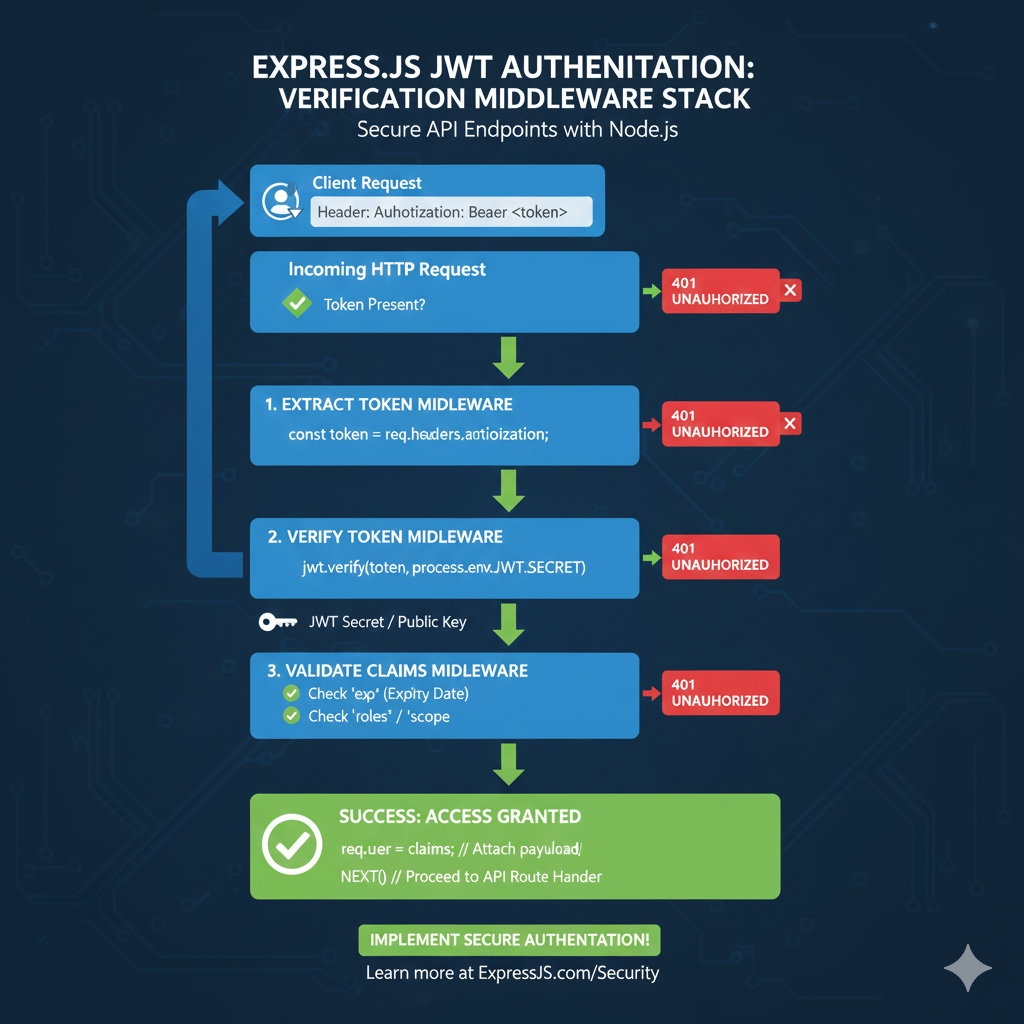
    JWT Verification Middleware Stack

    This infographic visualizes the stateless security checks that happen sequentially on every protected route in an Express.js application, ensuring only valid users gain access.

    Incoming HTTP Request (Token Check) 📨

    The process begins when a client attempts to access a protected API route.

    • Client Request: The user sends a request with the JWT in the Authorization: Bearer <token> header.
    • Initial Check: The system verifies if the Token is Present.
      • Failure: If no token is found, the system immediately returns a 401 UNAUTHORIZED error.

    1. Extract Token Middleware 🎣

    This step retrieves the JWT string from the HTTP header.

    • Action: Code extracts the token (e.g., const token = req.headers.authorization;).
      • Failure: If extraction fails (e.g., header malformed), returns 401 UNAUTHORIZED.

    2. Verify Token Middleware 🔑

    This is the core security check, ensuring the token has not been tampered with.

    • Action: Code uses the signing key to verify the signature (e.g., jwt.verify(token, process.env.JWT_SECRET)).
    • Requirement: Access to the JWT Secret / Public Key is needed for this cryptographic check.
      • Failure: If the signature is invalid (meaning the token was changed) or the token is malformed, returns 401 UNAUTHORIZED.

    3. Validate Claims Middleware ✔️

    This final check ensures the token is still usable, even if the signature is valid.

    • Checks:
      • Check exp (Expiry Date): Ensures the token has not expired.
      • Check roles / scope: Validates the user has the necessary permissions for the route.
      • Failure: If any claim validation fails, returns 401 UNAUTHORIZED.

    SUCCESS: Access Granted! 🎉

    If all middleware steps pass, access is granted.

    • Action: The token’s claims (payload) are attached to the request object (e.g., req.user = claims;).
    • Result: NEXT() is called to proceed to the main API route handler.

    learn for more knowledge

    Json Parser ->WHAT IS API JSON Parser – JSON Parser API – JSON.parse – json parse

    Mykeywordrank->Google Website Rank Checker- Track Your Keyword Rank and SEO Performance – keyword rank checker

    Json Compare ->What Is JSON Diff Online? (Beginner-Friendly Explanation) – online json comparator

    Fake Json –>Fake JSON API: Using JSONPlaceholder, DummyJSON, and Mock API – fake api

  • Auth0 JWT Token: How to Integrate and Verify JWT Tokens in Your Application

    Understanding Auth0 JWT Tokens: A Comprehensive Guide

    JSON Web Tokens (JWTs) are a compact, URL-safe means of representing claims to be transferred between two parties. When you integrate Auth0 into your application, JWT tokens become the cornerstone of your authentication and authorization strategy. This guide will walk you through how to use and verify Auth0 JWT tokens effectively, boosting your application’s security and user experience. These tokens are fundamental to OpenID Connect (OIDC) flows.


    What is a JWT Token and Why Auth0 Uses Web Tokens?

    A JWT token consists of three parts separated by dots (.): a header, a payload, and a signature. Auth0 issues these json web tokens after a user successfully authenticates. They are stateless, which simplifies scalability for modern applications.

    • Header: Specifies the algorithm used for signing (e.g., RS 256).
    • Payload: Contains claims or statements about the user and additional data. These include registered claims like iss, exp, and aud, as well as any custom claims or private claims.
    • Signature: Used to verify that the sender of the web token is who it says it is and to ensure that the message hasn’t been tampered with. It is created by signing the encoded header and payload with a secret or private key.

    How to Obtain an Auth0 JWT Token (JWT Access)

    When a user logs in via Auth0, your application typically receives an ID$ Token and/or an Access Token. The ID Token is a JWT token containing user identity (identity), while the Access Token is also a JWT used for authorization (jwt access) to protected API resources (api token).

    Token Claims: The ID Token contains standard user claims, while the Access Token contains authorization claims relevant to the API.

    Here’s a simplified example of how you might initiate a login flow using Auth0’s JavaScript SDK:

    JavaScript

    // ... (SDK setup code) ...
    
    async function handleRedirectCallback() {
      if (window.location.search.includes('code=')) {
        await auth0.handleRedirectCallback();
        const token = await auth0.getIdTokenClaims();
        console.log('ID Token:', token.__raw); // This is the raw Auth0 JWT Token
    
        const accessToken = await auth0.getTokenSilently();
        console.log('Access Token:', accessToken); // This is the JWT Access token
      }
    }
    // ...
    

    Verifying Auth0 JWT Tokens and Token Lifetime

    Verifying a JWT token is crucial for security. It ensures that the token was issued by Auth0 and hasn’t been altered. This process usually happens on your backend server and must respect the token lifetime (exp claim).

    1. Check the Signature (Using JWKS)

    The signature must be verified using the public key provided by Auth0 (for RS 256). Auth0 provides a JWKS (JSON Web Key Set) endpoint (https://YOUR_AUTH0_DOMAIN/.well-known/jwks.json) which contains the public keys. This is how the API can trust the signed web token.

    2. Validate Claims (Registered and Private Claims)

    After verifying the signature, you must validate several essential token claims within the payload:

    • iss (Issuer): Must match your Auth0 domain.
    • aud (Audience): Must match your API identifier.
    • exp (Expiration Time): Essential for controlling token lifetime.
    • Standard Claims: Check other standard claims (iat, nbf) and any expected private claims or custom claims.

    Most JWT libraries will handle these validations automatically once configured correctly. If you need to inspect the contents for debugging or learning, you can use an online jwt debugger.

    JavaScript

    // Node.js example using express-oauth2-jwt-bearer
    const jwtCheck = auth({
      audience: 'YOUR_API_IDENTIFIER',
      issuerBaseURL: 'https://YOUR_AUTH0_DOMAIN/',
      tokenSigningAlg: 'RS256'
    });
    
    // Enforce authentication on all routes using the JWT access token
    app.use(jwtCheck); 
    // ...
    

    Conclusion

    Auth0 JWT tokens provide a secure and efficient way to manage authentication and authorization in modern applications. By understanding their structure, how to obtain them, and most importantly, how to verify them—including respecting the token lifetime and validating all token claims—you can build robust and scalable systems. Always ensure your backend correctly validates every incoming JWT to maintain the integrity and security of your API.

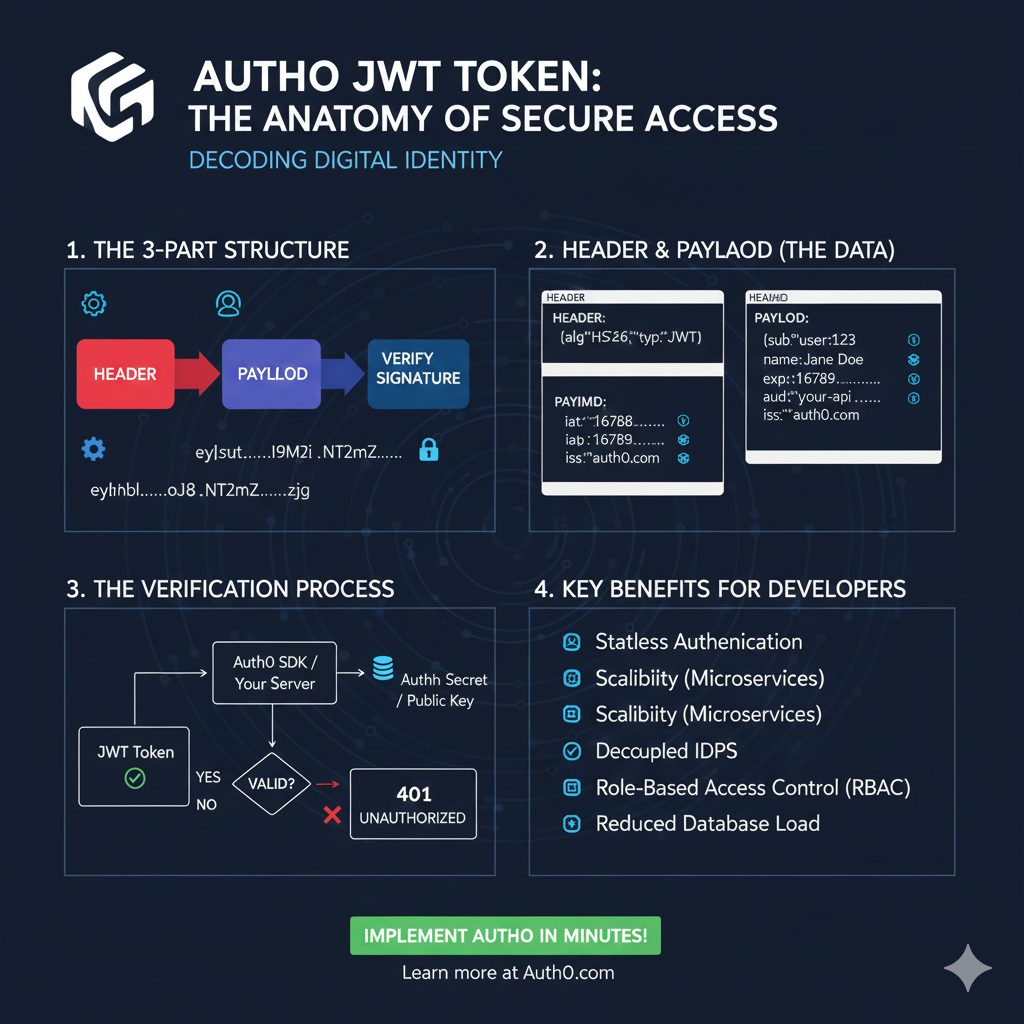
    Auth0 JWT Token: Anatomy of Secure Access

    This infographic details the structure, usage, and benefits of a JWT, focusing on how it provides secure and stateless access.

    1. The 3-Part Structure 🧩

    A JWT is composed of three base64-encoded parts, separated by dots, which are used to verify the token’s integrity.

    • Header (Red): The first part, containing the token type (typ: JWT) and the signing algorithm (e.g., alg: HS256).
    • Payload (Blue): The middle part, containing the data claims (user ID, expiration, roles, etc.).
    • Signature: The cryptographic hash used to Verify Signature. The entire token is represented as eyhhbl.....oj8.NT2Mz.....zjg.

    2. Header & Payload (The Data) 🔑

    This section provides a closer look at the key-value pairs stored within the first two parts of the token.

    PartClaim KeyExample Value & Description
    HEADERalg, typalg: HS256 and typ: JWT
    PAYLOADsubSubject/User ID (e.g., user:123)
    PAYLOADnameUser’s Name (e.g., Jane Doe)
    PAYLOADexpExpiration Time (e.g., 16789...)
    PAYLOADiss, audIssuer (auth0.com) and Audience (your-api)

    3. The Verification Process ✅

    This flowchart explains the server-side process for determining if an incoming token is trustworthy.

    1. JWT Token Received: An incoming token is submitted to the server.
    2. Verification: The token is passed through the Auth0 SDK / Your Server.
    3. Key Check: The server uses the Auth Secret / Public Key to check the signature.
    4. Result:
      • VALID: Access is granted.
      • INVALID: If the signature is incorrect or the token is expired, the server returns a 401 UNAUTHORIZED error.

    4. Key Benefits for Developers ✨

    Using JWTs provides several architectural advantages for API development.

    • Stateless Authentication.
    • Scalability (especially for Microservices).
    • Decoupled IDPS (Identity Providers).
    • Role-Based Access Control (RBAC).
    • Reduced Database Load.

    learn for more knowledge

    Json Parser ->WHAT IS API JSON Parser – JSON Parser API – JSON.parse – json parse

    Mykeywordrank ->SEO Ranking Checker -Keyword Rank Checker – keyword rank checker

    Json Compare ->JSONCompare: The Ultimate JSON Compare Tool – online json comparator

    Fake Json –>What is Dummy JSON Data- Free Fake Rest Api JSON Data – fake api

  • OAuth JWT- Mastering OAuth 2.0 and JWT for Secure API Authentication

    Introduction to JSON Web Tokens (JWT) and OAuth 2.0

    In today’s interconnected web, securing your APIs and user data is paramount. Two powerful standards often used together to achieve this are OAuth 2.0 and JSON Web Tokens (JWT). While OAuth 2.0 handles authorization, JWT provides a secure, self-contained way to transmit information between parties. This guide will walk you through how to integrate these two technologies to build a robust and scalable authentication and authorization system.


    What is OAuth 2.0? The Authorization Flow

    OAuth 2.0 (Open Authorization) is an industry-standard protocol for authorization. It allows a user to grant a third-party application (app) limited access to their resources on another service without sharing their credentials. It acts as an intermediary, delegating access rather than sharing passwords. This protocol defines a specific flow for granting access.

    Key Roles in OAuth 2.0:

    • Resource Owner: The user who owns the data and grants access (via consent and login).
    • Client: The application requesting access.
    • Authorization Server: The server that handles authentication and issues tokens after obtaining authorization. This is often referred to as the authentication server.
    • Resource Server: The server that hosts the protected resources and accepts access tokens to grant access.

    What is JWT (JSON Web Token)?

    A JSON Web Token (JWT) is a compact, URL-safe means of representing claims to be transferred between two parties. The claims in a JWT (JWTS) are encoded as a JSON object that is digitally signed.

    Structure of a JWT:

    A JWT consists of three parts separated by dots: Header.Payload.Signature.

    • Header: Specifies the algorithm (algorithm) used for signing.
    • Payload: Contains the claims (identity) about the user and the granted permissions.
    • Signature: Used to verify the sender of the JWT and ensure the message hasn’t been changed.

    Why Combine OAuth 2.0 with JWT? (JWT Access Token)

    While OAuth 2.0 is an authorization framework, it doesn’t specify the format of the access token. By using JWTs as OAuth 2.0 access tokens, you gain several advantages essential for modern API security:

    • Statelessness: The server can validate the jwt access token purely by its signature and claims within it.
    • Self-contained Information: JWTs can carry user information, roles, and permissions directly in the token, allowing resource servers to make jwt authorization decisions without database lookups.
    • Decoupling: Authorization and resource servers become more independent.
    • JWT Authentication and Authorization: The JWT provides both authentication (who the user is) and authorization (access) data instantly.

    How to Implement OAuth 2.0 with JWT for Secure APIs

    The general flow for using OAuth 2.0 with JWTs involves the following steps:

    Implementation Flow:

    1. User Initiates Request: A user attempts to access a protected resource on your client application.
    2. Client Redirects to Authorization Server: The client app redirects the user’s browser to the Authorization Server’s login page.
    3. User Authenticates and Grants Access: The user performs login and grants the client application permission to access their resources (consent).
    4. Authorization Server Issues Authorization Code: The Authorization Server redirects the user back to the client application with an authorization code.
    5. Client Exchanges Code for JWT: The client sends the authorization code (along with its client ID and client secret) to the Authorization Server’s token endpoint. This exchange can also involve a jwt assertion or oauth assertion (such as Client Assertion) for enhanced security.
    6. Authorization Server Issues JWT (Access Token) and Refresh Token: The Authorization Server issues a JWT (as the access token) and often a refresh token.
    7. Client Uses JWT to Access Resource Server: The client application includes the JWT in the Authorization header of its requests to the Resource Server (e.g., Authorization: Bearer [JWT]).
    8. Resource Server Validates JWT: The Resource Server validates the JWT’s signature using the Authorization Server’s public key. It also checks the expiration (exp), issuer (iss), and audience (aud) claims to enforce jwt authorization.

    Best Practices for OAuth 2.0 with JWT

    Adherence to these practices ensures a high level of security for your API and application:

    • Use HTTPS Everywhere: Always transmit tokens over secure HTTPS connections.
    • Short-Lived Access Tokens: Keep jwt access tokens short-lived (e.g., 5-15 minutes).
    • Use Refresh Tokens: Pair short-lived access tokens with longer-lived refresh tokens.
    • Strong Key Management: Use strong secrets. For production, consider asymmetric algorithms (RS 256).
    • Validate All Claims: Resource servers must rigorously validate all relevant claims on every incoming JWT.
    • Avoid Storing Sensitive Data in JWT Payload: JWTs are encoded, not encrypted by default. Do not put highly sensitive, unencrypted data in the payload.

    By carefully implementing the OAuth JWT combination and adhering to these best practices, you can build a highly secure, scalable, and efficient jwt authentication and authorization system for your APIs. This combination provides a robust framework for managing access to your valuable resources while enhancing the user experience.

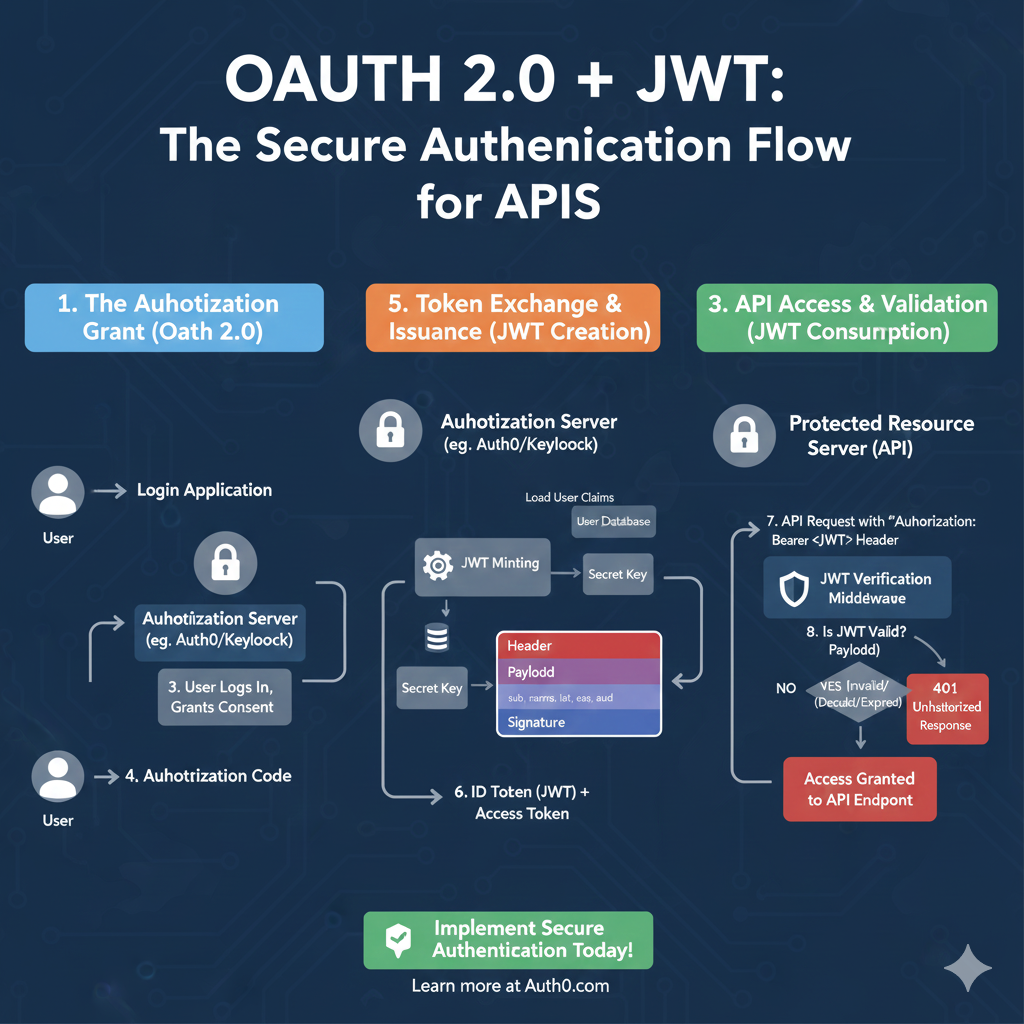
    OAuth 2.0 + JWT Flow

    This infographic details the secure authentication process, divided into three stages: Authorization, Token Issuance, and API Validation.

    1. The Authorization Grant (OAuth 2.0) 🤝

    This phase handles the user logging in and granting permission to the application.

    • 1. Login Application: The User initiates a login request through the application.
    • 2. Authorization Server: The application redirects the user to the Authorization Server (e.g., Auth0/Keycloak).
    • 3. User Logs In, Grants Consent: The user successfully authenticates and approves the application’s access request.
    • 4. Authorization Code: The Authorization Server sends a short-lived Authorization Code back to the Login Application.

    2. Token Exchange & Issuance (JWT Creation) 🔑

    This is the secure backend step where the Authorization Code is exchanged for the actual JWT and Access Token.

    • Load User Claims: The Authorization Server loads the user data from the User Database.
    • JWT Minting: The server uses the Secret Key to sign the token.
    • JWT Structure: The token is created with the Header, Payload (containing claims like sub, exp, aud), and the Signature.
    • 6. ID Token (JWT) + Access Token: The client receives the final ID Token (the JWT) and the Access Token.

    3. API Access & Validation (JWT Consumption) ✅

    This phase verifies the JWT when the client attempts to access a protected resource.

    • 7. API Request: The client sends an API Request to the Protected Resource Server (API) with the token in the Authorization: Bearer <JWT> Header.
    • JWT Verification Middleware: The server uses the same Secret Key to verify the token’s signature and claims.
    • 8. Is JWT Valid?:
      • Yes: If valid, the user is granted Access Granted to API Endpoint.
      • No: If invalid (e.g., expired or tampered), the server returns a 401 Unauthorized Response.
    oauth 2,0

    learn for more knowledge

    Json Parser ->What Is Node.js Body Parser? express body-parser (Explanation) – json parse

    Mykeywordrank ->What Is Seo Rank and seo analyzer – keyword rank checker

    Json Compare ->Online Compare JSON, JSON Compare, JSON Compare Tool, JSON Diff – online json comparator

    Fake Json –>What is FakeStore API: Beginner-Friendly Guide to Using Fake E-Commerce Data – fake api

  • How to Use com auth0 jwt jwt for JWT Verification and Creation in Java

    Introduction to JSON Web Tokens (JWT) and Auth0

    JSON Web Tokens (JWTs) are a compact, URL-safe means of representing claims to be transferred between two parties. They are widely used for jwt authentication and information exchange in modern web applications. Auth0 is a popular identity management platform, and they provide a robust Java library, com.auth0.jwt (java jwt), to handle JWT operations. JSON Web Tokens are often simply referred to as tokens or web tokens.

    A JWT consists of three parts: the jwt header, the jwt payload, and the jwt signature. This guide will walk you through the essential steps to integrate and utilize the com.auth0.jwt library in your Java projects for verifying, decoding, and creating JWTs.


    Step 1: Add the com.auth0.jwt Dependency

    First, you need to add the java-jwt dependency to your project’s build file. Below are examples for Maven and Gradle.

    Maven

    XML

    <dependency>
        <groupId>com.auth0</groupId>
        <artifactId>java-jwt</artifactId>
        <version>4.4.0</version> </dependency>
    

    Gradle

    Gradle

    implementation 'com.auth0:java-jwt:4.4.0' // Use the latest version
    

    Step 2: How to Verify a JWT with com.auth0.jwt (JWT Verification)

    Verifying a JWT is crucial for ensuring its authenticity and integrity. This involves checking the jwt signature and validating its claims (e.g., expiration, issuer, audience). The verification process uses a jwt algorithm (like HMAC256 along with a secret key (public or private) to recreate and compare the jwt signature.

    Java

    import com.auth0.jwt.JWT;
    import com.auth0.jwt.JWTVerifier;
    import com.auth0.jwt.algorithms.Algorithm;
    import com.auth0.jwt.exceptions.JWTVerificationException;
    import com.auth0.jwt.interfaces.DecodedJWT;
    
    public class JwtVerifierExample {
    
        public static void main(String[] args) {
            String token = "YOUR_SAMPLE_JWT_HERE"; // Replace with an actual sample jwt
            String secret = "YOUR_SECRET_KEY"; // Replace with your secret key
    
            try {
                Algorithm algorithm = Algorithm.HMAC256(secret);
                JWTVerifier verifier = JWT.require(algorithm) // Uses jwt require method
                    .withIssuer("auth0") // Validates expected issuer claim
                    .withAudience("your-app") // Validates expected audience
                    .build(); // Reusable verifier instance
    
                DecodedJWT jwt = verifier.verify(token);
                System.out.println("JWT is valid! Subject: " + jwt.getSubject());
                // Claims table can be retrieved from the DecodedJWT object
            } catch (JWTVerificationException exception) {
                // Invalid signature/claims
                System.err.println("JWT Verification Failed: " + exception.getMessage());
            }
        }
    }
    

    Step 3: How to Decode a JWT (Inspect JWT Payload and Header)

    Sometimes you might need to inspect the contents of a JSON Web Token without verifying its jwt signature. This is useful for debugging or previewing claims, but should NOT be used for security-sensitive decisions regarding user access. The jwt decode function is used for this purpose.

    Java

    import com.auth0.jwt.JWT;
    import com.auth0.jwt.interfaces.DecodedJWT;
    
    public class JwtDecoderExample {
    
        public static void main(String[] args) {
            String token = "YOUR_JWT_STRING_HERE"; // Replace with an actual JWT
    
            try {
                DecodedJWT jwt = JWT.decode(token); // jwt decode method
    
                System.out.println("JWT Header: " + jwt.getHeader()); // Accesses the jwt header
                System.out.println("JWT Payload: " + jwt.getPayload()); // Accesses the jwt payload
                System.out.println("JWT Signature: " + jwt.getSignature());
                System.out.println("Custom Claim 'name': " + jwt.getClaim("name").asString()); // Accessing custom claims
    
            } catch (Exception e) {
                System.err.println("Error decoding JWT: " + e.getMessage());
            }
        }
    }
    
    ---
    
    ## Step 4: How to Create a JWT with com.auth0.jwt
    
    Creating a **JWT** involves defining its **claims** (**jwt payload**), setting an expiration time, and signing it with a **jwt algorithm** and a **secret key** (or **private key**). This process uses the **jwt builder** pattern.
    
    ```java
    import com.auth0.jwt.JWT;
    import com.auth0.jwt.algorithms.Algorithm;
    import java.util.Date;
    import java.util.Calendar;
    
    public class JwtCreatorExample {
    
        public static void main(String[] args) {
            String secret = "YOUR_SECRET_KEY"; // Replace with a strong secret key
            String issuer = "auth0";
            String audience = "your-app";
            String subject = "user123";
    
            try {
                Algorithm algorithm = Algorithm.HMAC256(secret);
    
                // Set expiration time (e.g., 1 hour from now)
                Calendar calendar = Calendar.getInstance();
                calendar.add(Calendar.HOUR_OF_DAY, 1);
                Date expiresAt = calendar.getTime();
    
                String token = JWT.create()
                    .withIssuer(issuer)
                    .withAudience(audience) // Standard claim
                    .withSubject(subject)
                    .withClaim("name", "John Doe") // Custom claim
                    .withClaim("admin", true) // Another custom claim
                    .withIssuedAt(new Date())
                    .withExpiresAt(expiresAt)
                    .sign(algorithm); // Generates the final jwt signature
    
                System.out.println("Generated JWT: " + token);
    
            } catch (Exception e) {
                System.err.println("Error creating JWT: " + e.getMessage());
            }
        }
    }
    

    Conclusion

    The com.auth0.jwt library provides a comprehensive and easy-to-use API for handling JSON Web Tokens in Java. By following these steps, you can securely verify, jwt decode, and create JWTS, enhancing the security of your applications. Always remember to keep your secret key secure and handle exceptions appropriately to build robust systems. The auth0 jwt toolset makes jwt authentication reliable in Java.

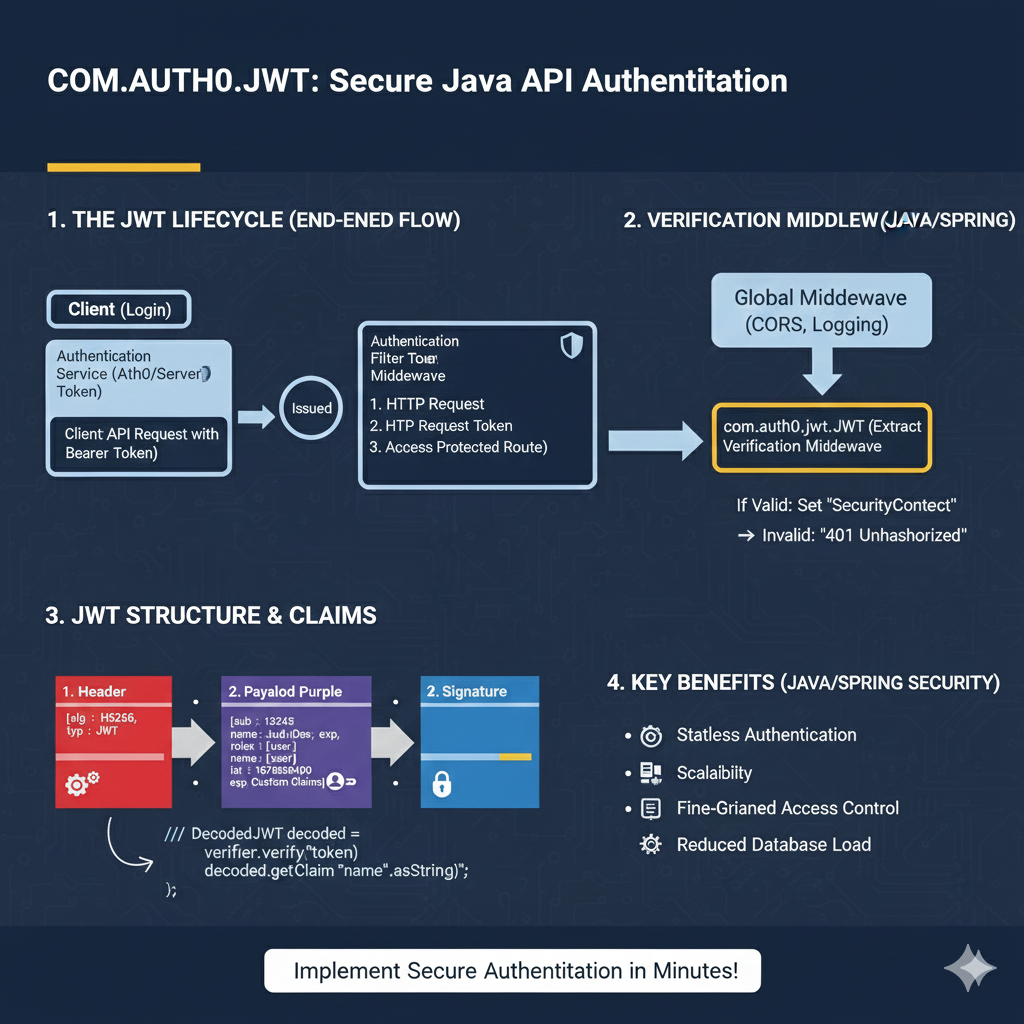
    COM.AUTH0.JWT Infographic

    This infographic breaks down the secure authentication process using the Auth0 JWT library in a Java API environment.


    1. The JWT Lifecycle (End-to-End Flow) 🔄

    This section illustrates the path of the token from issuance to validation on the server.

    1. Client (Login): The client obtains an Authentication Token from the Identity Provider (Auth0/Server).
    2. Issued: The token is received by the client.
    3. Authentication Middleware: The server receives the client request with the Bearer Token. The token goes through a filter/middleware before accessing the protected route.
    4. Verification Middleware: The request passes through Global Middleware (CORS, Logging) and then hits the com.auth0.jwt verification middleware.
      • If Valid: The server sets the “Security Context”.
      • If Invalid: The server returns a “401 Unauthorized” response.

    2. JWT Structure & Claims 🧩

    This section details the anatomy of the token and how the Java library interacts with its parts.

    • 1. Header (Red): Contains metadata like alg: HS256 and typ: JWT.
    • 2. Payload (Purple): Contains the user and authorization Claims. Example claims include sub: 13245, name: JudiDoe, and exp: 1678890000 (expiration).
    • 3. Signature (Blue): The cryptographic hash used solely for verification.

    The library decodes and verifies the token using Java code similar to: verifier.verify(token) and decoded.getClaim("name").asString().


    3. Key Benefits (Java/Spring Security) ✨

    The use of JWTs offers several architectural advantages for Java APIs.

    • Stateless Authentication: The server doesn’t need to store session data.
    • Scalability: Easier to distribute load across multiple servers without shared session storage.
    • Fine-Grained Access Control: Permissions can be stored directly in the token payload.
    • Reduced Database Load: Fewer database lookups are needed per request since user details are in the token.

    learn for more knowledge

    Json Parser ->What Is jQuery JSON Parser, jQuery. Parse.Json, JSON.parse, jQuery.getJSON, ParseJSON Explanation) – json parse

    MyKeywordrank ->SEO Optimization Checker: Mastering Website SEO Optimization and Rankings – keyword rank checker

    Json Compare ->What is Compare JSON Objects Online: Beginner-Friendly Guide – online json comparator

    Fake Json –Why Dummy JSON API Is Used? Complete Guide to Dummy API, JSON API, DummyJSON, JSONPlaceholder & Fake Data Tools – fake api

  • How to Implement JWT Authentication in Node.js with Express

    Introduction to JWT and Node.js Authentication

    Securing APIs and web applications is paramount in modern web development. JSON Web Tokens (JWT) have emerged as a popular, efficient, and secure method for handling authentication and authorization. This guide will walk you through the process of implementing JWT authentication in your Node.js applications using the Express framework.

    By the end of this tutorial, you’ll have a clear understanding of:

    • What JWTs are and how they work.
    • Setting up a Node.js Express project for JWT.
    • Generating and verifying JWTs for user authentication.
    • Protecting API routes with JWT middleware.

    Prerequisites

    Before we dive into the implementation, make sure you have the following:

    • Node.js and npm installed on your machine.
    • Basic understanding of JavaScript and Node.js.
    • Familiarity with Express.js framework.
    • A code editor (e.g., VS Code).

    Understanding JSON Web Tokens (JWT)

    A JWT is a compact, URL-safe means of representing claims to be transferred between two parties. The claims in a JWT are encoded as a JSON object and are digitally signed using a secret (or a public/private key pair) to ensure their integrity. JWTs consist of three parts, separated by dots (.):

    JWT Structure

    • Header: Typically consists of two parts: the type of the token, which is JWT, and the signing algorithm being used (e.g., HMAC SHA256 or RSA).
    • Payload: Contains the claims. Claims are statements about an entity (typically, the user) and additional data. There are three types of claims: registered, public, and private claims.
    • Signature: Created by taking the encoded header, the encoded payload, a secret, and the algorithm specified in the header. This signature is used to verify that the sender of the JWT is who it says it is and to ensure that the message hasn’t been tampered with.

    Step-by-Step Implementation of JWT in Node.js

    1. Project Setup and Dependencies

    First, let’s create a new Node.js project and install the necessary packages:

    mkdir nodejs-jwt-auth
    cd nodejs-jwt-auth
    npm init -y
    npm install express jsonwebtoken dotenv bcryptjs

    Here’s a brief explanation of the packages:

    • express: Our web framework for building the API.
    • jsonwebtoken: For creating and verifying JWTs.
    • dotenv: To load environment variables from a .env file.
    • bcryptjs: For hashing user passwords securely.

    2. Environment Variables (.env)

    Create a .env file in your project root to store sensitive information like your JWT secret key. This keeps your secrets out of your source code.

    SECRET_KEY=your_super_secret_jwt_key_here
    PORT=3000

    3. Basic Server Setup (app.js or server.js)

    Create your main application file (e.g., app.js) and set up a basic Express server:

    require('dotenv').config();
    const express = require('express');
    const jwt = require('jsonwebtoken');
    const bcrypt = require('bcryptjs');
    
    const app = express();
    const PORT = process.env.PORT || 3000;
    const SECRET_KEY = process.env.SECRET_KEY;
    
    app.use(express.json()); // Enable JSON body parser
    
    // --- Temporarily store users for demonstration ---
    const users = []; 
    
    app.get('/', (req, res) => {
      res.send('Welcome to the JWT Authentication API');
    });
    
    app.listen(PORT, () => {
      console.log(`Server running on port ${PORT}`);
    });

    4. User Registration (Optional but Recommended)

    For a complete authentication flow, users need to register. This involves hashing their password before saving it.

    // User registration endpoint
    app.post('/register', async (req, res) => {
      const { username, password } = req.body;
    
      if (!username || !password) {
        return res.status(400).json({ message: 'Username and password are required' });
      }
    
      // Check if user already exists
      if (users.find(u => u.username === username)) {
        return res.status(409).json({ message: 'User already exists' });
      }
    
      try {
        const hashedPassword = await bcrypt.hash(password, 10); // Hash password with salt rounds = 10
        const newUser = { id: users.length + 1, username, password: hashedPassword };
        users.push(newUser);
        res.status(201).json({ message: 'User registered successfully', user: { id: newUser.id, username: newUser.username } });
      } catch (error) {
        res.status(500).json({ message: 'Error registering user', error: error.message });
      }
    });

    5. User Login and Token Generation

    Upon successful login, we’ll generate a JWT and send it back to the client. The client will then use this token for subsequent authenticated requests.

    // User login endpoint
    app.post('/login', async (req, res) => {
      const { username, password } = req.body;
    
      if (!username || !password) {
        return res.status(400).json({ message: 'Username and password are required' });
      }
    
      const user = users.find(u => u.username === username);
      if (!user) {
        return res.status(400).json({ message: 'Invalid credentials' });
      }
    
      const isMatch = await bcrypt.compare(password, user.password);
      if (!isMatch) {
        return res.status(400).json({ message: 'Invalid credentials' });
      }
    
      // Generate JWT
      const token = jwt.sign(
        { userId: user.id, username: user.username },
        SECRET_KEY,
        { expiresIn: '1h' } // Token expires in 1 hour
      );
    
      res.json({ message: 'Logged in successfully', token });
    });

    6. Protecting Routes with JWT Middleware

    To protect specific routes, we’ll create a middleware function that verifies the JWT provided in the request header.

    // Middleware to verify JWT
    const authenticateToken = (req, res, next) => {
      const authHeader = req.headers['authorization'];
      const token = authHeader && authHeader.split(' ')[1]; // Format: Bearer TOKEN
    
      if (token == null) {
        return res.status(401).json({ message: 'Access Denied: No Token Provided' });
      }
    
      jwt.verify(token, SECRET_KEY, (err, user) => {
        if (err) {
          return res.status(403).json({ message: 'Access Denied: Invalid Token' });
        }
        req.user = user; // Attach user payload to the request
        next(); // Proceed to the next middleware/route handler
      });
    };
    
    // Example protected route
    app.get('/protected', authenticateToken, (req, res) => {
      res.json({ message: `Welcome ${req.user.username} to the protected route!`, user: req.user });
    });

    Now, any request to /protected will first go through the authenticateToken middleware. If the token is valid, the request proceeds; otherwise, an error is returned.

    Conclusion

    You’ve now successfully implemented a basic JWT authentication system in your Node.js Express application. This setup provides a robust and scalable way to secure your API endpoints, ensuring that only authenticated users can access sensitive resources.

    Remember to always keep your SECRET_KEY highly confidential and consider using more advanced JWT features like refresh tokens for better security practices in production environments. Experiment with different token expiration times and error handling to tailor it to your application’s needs.

    The image you provided is a stack diagram titled “Verification Middleware Stack”. It illustrates the flow of an HTTP request through a Node.js/Express server, specifically focusing on the placement and action of the JWT verification middleware.

    Here is the structured content for this stack diagram:

    JWT Verification Middleware Stack

    This diagram shows the sequential execution of middleware functions and how they handle a request seeking access to a protected route.


    1. Global Middleware (Top of the Stack)

    This middleware runs on almost every request before specific security checks.

    • Function: Handles general server tasks like Logging (Morgan), CORS (Cross-Origin Resource Sharing), and Body Parsing (express.json()).
    • Outcome: If successful, the request passes to the next middleware.

    2. Authorization Header Check

    This is the initial security check that ensures a token is even present.

    • Function: Checks for the Authorization header (e.g., Bearer <token>).
    • Outcome: If a header is present, it Passes to next middleware (the JWT Verification Middleware).

    3. JWT Verification Middleware (The Core Security Check)

    This is the custom middleware (e.g., verifyToken) that uses the Node.js JWT library to validate the token.

    • Verification Action: Uses the library function (verify, secret) to validate the token’s signature, expiration, and claims.
      • Success: If valid, the payload is decoded, and the user data is attached to the request object (req.user = decoded).
      • Failure: If invalid, expired, or tampered with, the middleware Adds status: 401, send “Unauthorized”.

    4. Protected Route Handler (The End Goal)

    This is the final destination, only accessible if the JWT verification step succeeds.

    • Function: Executes the specific business logic (e.g., app.post('/api/data', ...)).
    • Access: Access is Granted if the request reaches this point; otherwise, the client receives an “Access Denied” or “Unauthorized” response from the verification step.

    learn for more knowledge

    Json Parser ->What is JSON Parser Online? Complete Guide for Beginners – json parse

    Mykeywordrank ->Search Optimization and SEO: Mastering Visibility in Search Results – keyword rank checker

    Json Compare ->JSON Comparator, Online JSON Diff, JSON Compare Tool – online json comparator

    Fake Json ->Testing Software Tools: Best Tools & Software to Create Fake JSON Data for Testing – fake api

  • How to Use com.auth0.jwt for Secure JWT Handling in Java

    Understanding and Implementing com.auth0.jwt in Java

    JSON Web Tokens (JWTs) have become a cornerstone for secure authentication and information exchange in modern web applications. When working with Java, the com.auth0.jwt library stands out as a robust and easy-to-use tool for handling JWTs. This guide will walk you through its core functionalities, from setup to advanced usage, helping you boost your application’s security.

    What is com.auth0.jwt?

    The com.auth0.jwt library is an open-source Java implementation of the JWT standard (RFC 7519). It provides a comprehensive API for:

    • Creating and signing JWTs.
    • Verifying JWT signatures and claims.
    • Decoding JWTs without verification.
    • Supporting various algorithms like HS256, HS384, HS512, RS256, RS384, RS512, and ES256, ES384, ES512.

    Its ease of use and adherence to standards make it a preferred choice for Java developers.

    Getting Started: Adding the Dependency

    To begin, you need to add the com.auth0.jwt dependency to your project. If you’re using Maven, include the following in your pom.xml:

    <dependency>
        <groupId>com.auth0</groupId>
        <artifactId>java-jwt</artifactId>
        <version>4.4.0</version> <!-- Use the latest stable version -->
    </dependency>

    For Gradle users, add this to your build.gradle:

    implementation 'com.auth0:java-jwt:4.4.0' <!-- Use the latest stable version -->

    How to Create and Sign a JWT

    Creating a JWT involves specifying claims (payload data) and signing it with a secret key using a chosen algorithm. Here’s an example using HMAC256:

    import com.auth0.jwt.JWT;
    import com.auth0.jwt.algorithms.Algorithm;
    import java.util.Date;
    
    public class JwtCreator {
        public static void main(String[] args) {
            try {
                Algorithm algorithm = Algorithm.create("secret"); // Or Algorithm.HMAC256("secret");
                String token = JWT.create()
                        .withIssuer("auth0")
                        .withSubject("user123")
                        .withAudience("web-app")
                        .withExpiresAt(new Date(System.currentTimeMillis() + 3600_000)) // 1 hour expiration
                        .withIssuedAt(new Date())
                        .withClaim("custom_claim", "custom_value")
                        .sign(algorithm);
    
                System.out.println("Generated JWT: " + token);
            } catch (Exception e) {
                e.printStackTrace();
            }
        }
    }

    In this example:

    • withIssuer(): Identifies the principal that issued the JWT.
    • withSubject(): Identifies the principal that is the subject of the JWT.
    • withAudience(): Identifies the recipients that the JWT is intended for.
    • withExpiresAt(): Specifies the expiration time on or after which the JWT MUST NOT be accepted.
    • withIssuedAt(): Identifies the time at which the JWT was issued.
    • withClaim(): Adds custom claims to the JWT payload.
    • sign(): Signs the JWT with the specified algorithm and secret.

    How to Verify a JWT

    Verification is crucial to ensure a JWT’s integrity and authenticity. This process checks the signature and validates claims like expiration time and issuer.

    import com.auth0.jwt.JWT;
    import com.auth0.jwt.JWTVerifier;
    import com.auth0.jwt.algorithms.Algorithm;
    import com.auth0.jwt.exceptions.JWTVerificationException;
    import com.auth0.jwt.interfaces.DecodedJWT;
    
    public class JwtVerifier {
        public static void main(String[] args) {
            String tokenToVerify = "YOUR_GENERATED_JWT_HERE"; // Replace with a valid JWT
            try {
                Algorithm algorithm = Algorithm.create("secret"); // Use the same secret as for signing
                JWTVerifier verifier = JWT.require(algorithm)
                        .withIssuer("auth0")
                        .withAudience("web-app")
                        .build(); // Reusable verifier instance
    
                DecodedJWT jwt = verifier.verify(tokenToVerify);
                System.out.println("JWT is valid!");
                System.out.println("Subject: " + jwt.getSubject());
                System.out.println("Custom Claim: " + jwt.getClaim("custom_claim").asString());
    
            } catch (JWTVerificationException exception){
                System.err.println("JWT Verification Failed: " + exception.getMessage());
                // Invalid signature/claims
            } catch (Exception e) {
                e.printStackTrace();
            }
        }
    }

    Key aspects of verification:

    • JWT.require(): Initiates the verification process with the expected algorithm.
    • withIssuer(), withAudience(), etc.: Specify expected claims for validation. Mismatches will cause verification to fail.
    • verify(): Performs the actual verification. If successful, returns a DecodedJWT object; otherwise, throws a JWTVerificationException.

    How to Decode a JWT Without Verification

    Sometimes, you might need to read the claims from a JWT without verifying its signature, for instance, to display user information or debug. This should be done with caution, as the token’s integrity is not guaranteed.

    import com.auth0.jwt.JWT;
    import com.auth0.jwt.interfaces.DecodedJWT;
    
    public class JwtDecoder {
        public static void main(String[] args) {
            String tokenToDecode = "YOUR_GENERATED_JWT_HERE"; // Replace with any JWT
            try {
                DecodedJWT jwt = JWT.decode(tokenToDecode);
    
                System.out.println("Decoded JWT Header: " + jwt.getHeader());
                System.out.println("Decoded JWT Payload: " + jwt.getPayload());
                System.out.println("Algorithm: " + jwt.getAlgorithm());
                System.out.println("Subject (from payload): " + jwt.getSubject());
                System.out.println("Custom Claim (from payload): " + jwt.getClaim("custom_claim").asString());
    
            } catch (Exception e) {
                System.err.println("Error decoding JWT: " + e.getMessage());
            }
        }
    }

    JWT.decode() parses the token and extracts its header and payload into a DecodedJWT object. It does not perform any signature validation or claim checks.

    Conclusion

    The com.auth0.jwt library simplifies JWT handling in Java, providing a secure and efficient way to implement token-based authentication. By understanding how to create, verify, and decode JWTs, you can build more robust and secure applications. Always ensure you handle your secret keys securely and validate all incoming tokens to prevent common security vulnerabilities.

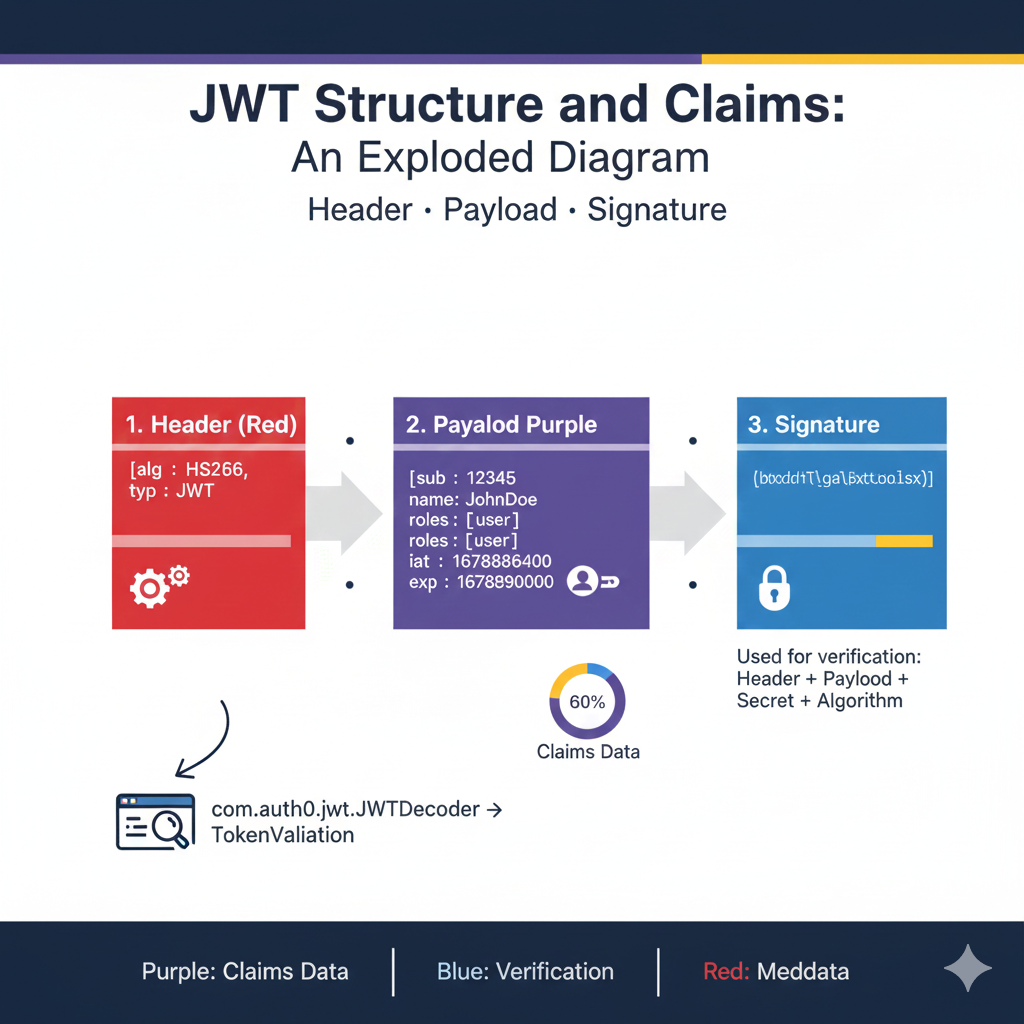
    JWT Structure and Claims Exploded Diagram

    This diagram illustrates the three distinct parts of a JSON Web Token and their function in authentication, with a focus on how the Auth0 Java library handles token validation.

    1. Header (Red) 🟥

    • Purpose: Contains metadata about the token itself.
    • Key Claims:
      • alg: The signing algorithm used (e.g., HS256).
      • typ: The type of token (JWT).
    • Library Function: The com.auth0.jwt.JWTDecoder reads this section to determine the expected validation method.

    2. Payload (Purple) 🟪

    • Purpose: Contains the actual data, or Claims, about the user and the session. This data makes up 60% of the token’s size (Claims Data).
    • Key Claims:
      • sub: Subject (e.g., user ID 12345).
      • roles: User roles (e.g., [user]).
      • iat: Issued At (timestamp).
      • exp: Expiration time (timestamp).
    • Library Function: The library extracts these claims for authorization and performs internal validation on claims like exp (to ensure the token is not expired).

    3. Signature (Blue) 🟦

    • Purpose: Used only for verification to ensure the token hasn’t been tampered with.
    • Contents: A cryptographic hash created using the Header + Payload + Secret + Algorithm.
    • Library Function: The com.auth0.jwt library performs TokenValidation by recreating the signature and comparing it to the signature in the token. If they match, the token is deemed authentic and the claims can be trusted .

    learn for more knowledge

    Json Parser ->What is JSON Parser Online? Complete Guide for Beginners – json parse

    MyKeyword rank ->Best Strategies to Rank on Google’s First Page in 2025 (Complete SEO Guide) – keyword rank checker

    Json Compare ->JSON Comparator, Online JSON Diff, JSON Compare Tool – online json comparator

    Fake Json ->Testing Software Tools: Best Tools & Software to Create Fake JSON Data for Testing – fake api

  • What Is Okta JWT? (Beginner-Friendly Explanation)

    Okta JWT refers to a JSON Web Token (JWT) that is created, signed, and verified by Okta, a popular identity and authentication platform. Okta uses JWTs (or tokens) to securely manage user login, API authorization, and access control in modern web applications.

    A JWT is a small, encoded token that contains user identity and permission information (known as claims). When generated by Okta, it becomes a trusted token that applications can validate to confirm whether a user is authenticated.


    Why Okta Uses JSON Web Token for JWT Authentication

    Okta leverages the stateless and secure nature of the JSON Web Token standard for robust JWT authentication and security:

    • Secure user authentication: Providing a verifiable identity token.
    • Authorizing access to API s and resources.
    • Single Sign-On SSO across multiple web applications.
    • Identity management and providing various jwt claims (e.g., user roles).
    • Protecting backend services by requiring a valid JWT token for access.

    What an Okta JWT Contains: Understanding JWT Claims and Types

    An Okta JWT is a single token that can be one of several jwt types (e.g., ID Token or Access Token, each serving a different purpose in authentication and authorization). Regardless of the type, every JWT contains verifiable information, known as claims:

    • Issuer (iss): Always identifies Okta as the origin.
    • Subject (sub): The unique User ID.
    • Audience (aud): The client ID or API that the token is intended for.
    • Expiration (exp): The token validation time.
    • Custom claims: Permissions, roles, email, or other data added by the Okta developer during configuration.

    How Okta JWT Works: Signature Verification and Signing Keys

    The security of the Okta JWT relies entirely on the jwt signature, which ensures the token hasn’t been tampered with.

    1. Okta Generates a JWT Signature

    • User Logs In: The user successfully authenticates through Okta.
    • Okta Generates a JWT: Okta creates the token (Header, Payload, Signature) and signs it using its private key. The Header specifies the signing algorithm (e.g., RS256).

    2. Token Validation via Signing Keys

    • Application Receives the Token: The application receives the JWT token.
    • Token Is Verified: The application verifies the jwt signature using Okta’s public key (which is publicly available via a standard endpoint).
      • This process uses the public key to check if the signature was genuinely created by the matching private key (signing keys) held by Okta. This is the core of token validation.
    • User Gets Access: If the validation passes, the user is granted secure access to protected resources.

    Benefits of Using Okta JWT

    Leveraging Okta for your JWT authentication provides significant advantages for your web application and API security:

    • High-level security backed by Okta‘s robust infrastructure.
    • Easy integration with API using the standard JWT format.
    • Seamless compatibility with OAuth 2.0 and OpenID Connect flows.
    • Reduces the need for building and managing custom authentication systems.
    • Scalable for enterprise-level apps and large numbers of clients and tokens.

    Final Summary

    The Okta JWT is a standardized, secure authentication token generated and verified by Okta. It serves as the cornerstone of JWT authentication in modern systems, enabling web applications to reliably confirm user identity, manage jwt claims, and protect API using strong security practices like private key signing and public key token validation.

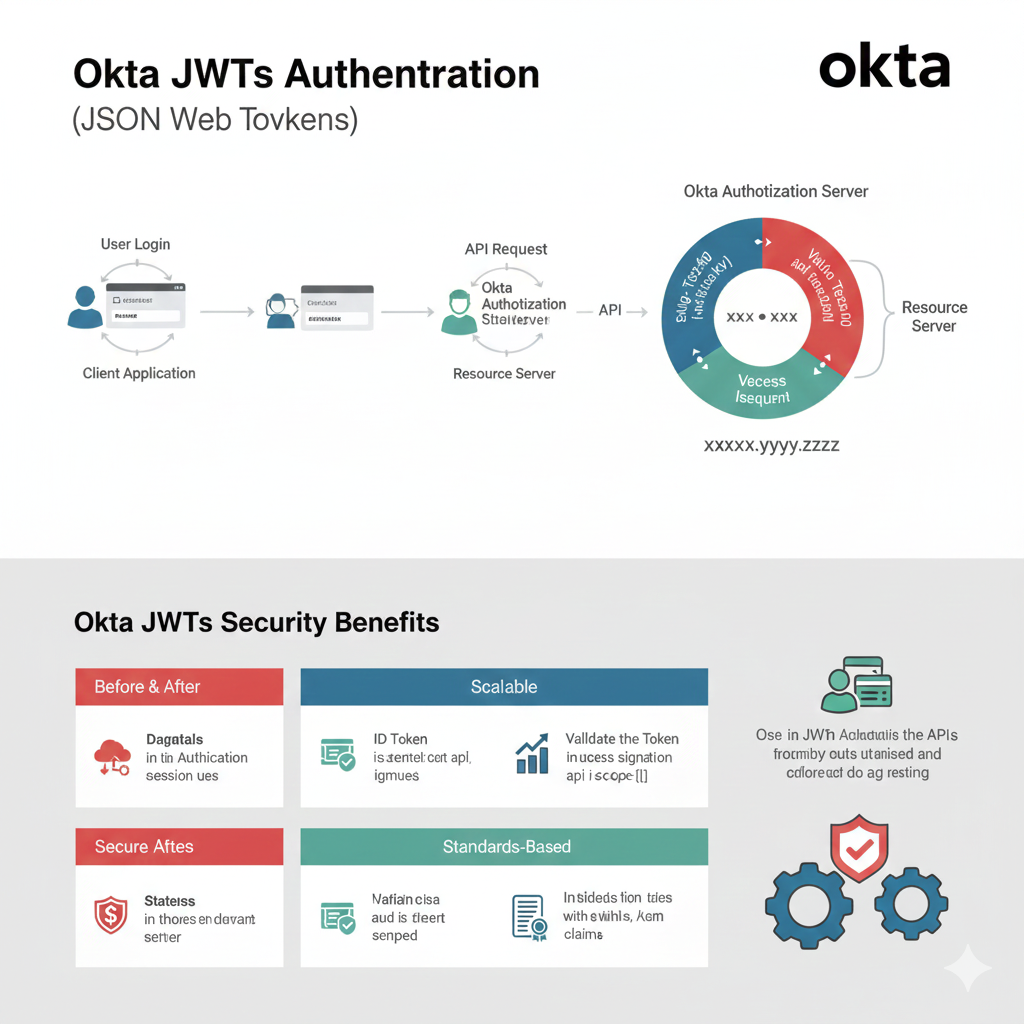
    “Okta JWTs Authentication (JSON Web Tokens)” Infographic

    This infographic explains the authentication flow using JSON Web Tokens (JWTs) facilitated by the Okta Authorization Server, and details the security benefits of using Okta JWTs.

    1. Authentication Flow (User Login to Resource Server)

    This section illustrates the typical sequence of events when a user attempts to access a protected resource.

    StepComponentActionDetails
    StartUser LoginThe user inputs credentials into the Client Application.The client sends credentials (e.g., username/password) to a secured endpoint.
    ExchangeOkta Authorization ServerOkta verifies the credentials and issues a token.The token contains a Header, Payload, and Signature.
    AccessAPI RequestThe client application attaches the JWT (access token) to the API request.The request goes to the Resource Server.
    ValidationResource ServerThe server validates the token’s signature using Okta’s public keys.The circular diagram shows the validation process (e.g., Value Texznd and Value Teczon segments).
    ResultResource ServerGrants Vececss Iseeuent (Successful Access).The server returns the requested resource.

    2. Okta JWTs Security Benefits

    This section highlights the key advantages of using JWTs, particularly when integrated with Okta.

    CategoryBenefitDescription
    Before & AfterDagataisImproves authentication session use.
    Secure AftecsStatelessImproves security and simplifies deployment.
    ScalableID TokenThe token is self-contained and signed.
    ScalableValidationValidates the token and its access scope.
    Standards-BasedStandardUses standard claims for authentication and audit.
    Standards-BasedClaimsProvides evidence with events, and key claims.
    General UseAPIs & ADUsed in APIs, Active Directory, and federated identity management.
    okta jwt authondication

    learn for more knowledge

    Json Parser ->APIDevTools JSON Schema Ref Parser: Resolving JSON Schema References – json parse

    mykeywordrank->Google Search Engine Optimization (SEO)-The Key to Higher Rankings – keyword rank checker

    Json Compare ->Online JSON Comparator, JSON Compare tool – online json comparator

    Fake Json ->Fake API: Why Fake JSON APIs Are Useful for Developers – fake api

  • What Is OneSpan Token

    A OneSpan Token is a secure authentication device or software app used to verify a user’s identity during login. OneSpan specializes in multi-factor authentication (MFA) and digital security, and the token provides a one-time password (OTP) or digital signature that keeps accounts safe. This technology provides secure access for millions of users.

    In simple words:

    👉 OneSpan Token = A security code generator used for safe logins and strong user authentication.


    Why OneSpan Tokens and Factor Authentication Are Used

    OneSpan Tokens add an extra layer of security—often referred to as a second factor authentication—for:

    • Banking logins and financial transactions.
    • Corporate systems and secure access to $\text{VPNs}$.
    • Government portals.
    • Secure mobile apps and high-risk solutions.

    Even if a user’s passwords are stolen, the attacker cannot log in without the token, making these solutions vital for comprehensive security.

    Note: While both are tokens, the OneSpan Token should not be confused with the JSON Web Token (JWT), which is a digital standard for transmitting information securely between parties.


    Types of OneSpan Tokens: Hardware and Software Authentication

    OneSpan provides various types of tokens to suit different security and user needs:

    1. Hardware Tokens (DIGIPASS Tokens)

    These are small physical devices that display a one-time password (OTP) code. The classic examples include the DIGIPASS one-button authenticators which simplify the user experience by requiring just one press to generate a code. These are physical tokens that work completely offline.

    2. Software Tokens (Soft Token / Token App)

    These are mobile apps like:

    • OneSpan Mobile Authenticator
    • OneSpan DIGIPASS

    These applications perform software authentication by generating the OTP on your phone. This approach is cost-effective and convenient, turning the user’s mobile device into a soft token.

    3. Push Authentication Tokens

    A notification is sent to your phone, and you simply tap approve or reject the login attempt. This method often forms the basis for modern passwordless user authentication solutions.


    How a OneSpan Token Works (One-Time Password)

    The mechanism behind the OneSpan Token is the generation of a time-based or event-based OTP:

    1. User enters username & passwords.
    2. OneSpan token generates a 6-digit or 8-digit one-time password (OTP).
    3. User enters the code into the system.
    4. The system verifies the code’s validity.
    5. Secure access login is complete.

    The codes change every 30–60 seconds, which is why they are extremely secure. The OneSpan ecosystem also supports advanced functions like $\text{eSignature}$ (digital signature).


    Benefits of OneSpan Tokens

    Using DIGIPASS tokens and other OneSpan authentication solutions provides:

    • ✔ Strong protection against hacking and unauthorized access.
    • ✔ Prevents unauthorized access and ensures secure access.
    • ✔ Works offline (especially the hardware tokens).
    • ✔ Easy to use (one-button authenticators).
    • ✔ Essential for high-risk industries like banking and finance.
    • ✔ Supports robust multifactor authentication (MFA).

    Conclusion

    A OneSpan Token is a critical security tool that generates one-time passwords or digital signatures to protect user authentication. It is widely adopted in banking and enterprise systems to ensure safe and verified logins, providing superior security through multiple factor authentication methods like software authentication and the convenient DIGIPASS one-button authenticators.

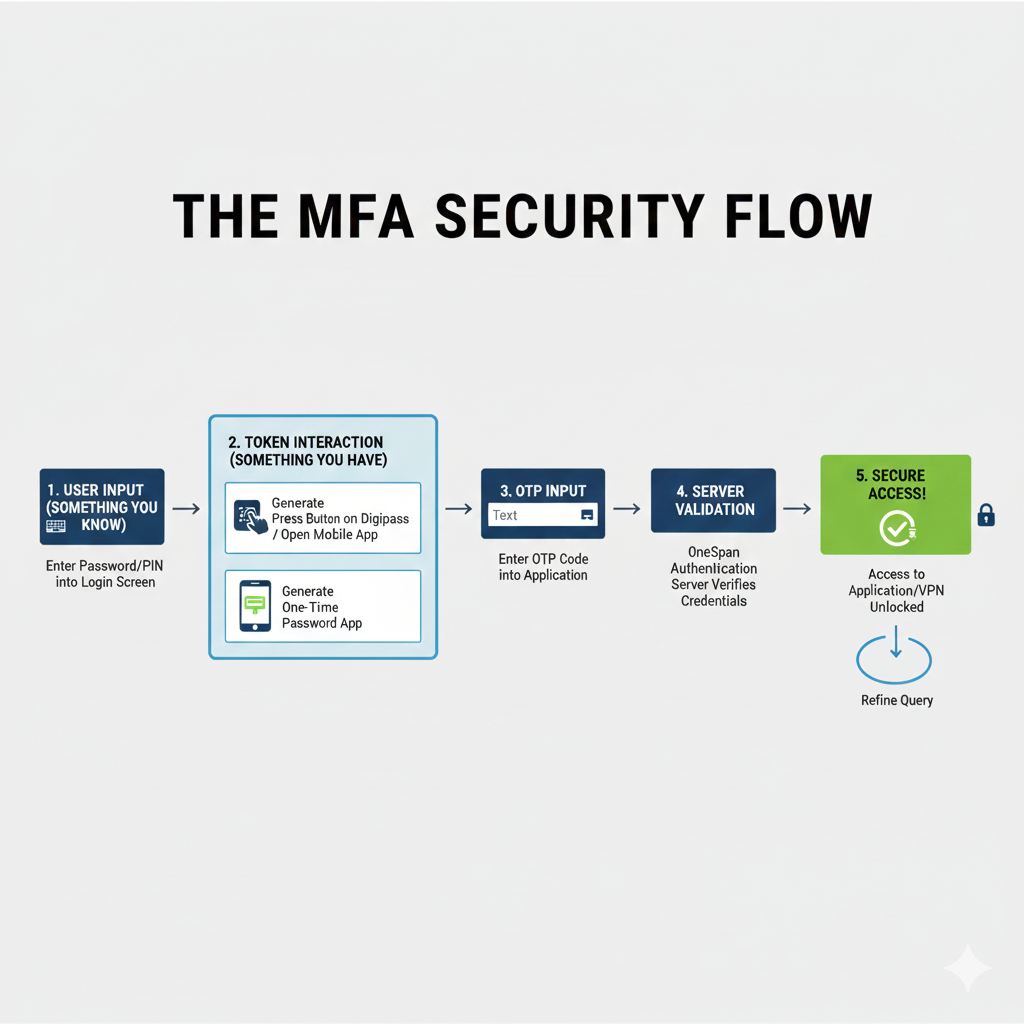
    “THE MFA SECURITY FLOW” Infographic

    This flowchart illustrates the step-by-step process of securing access using a OneSpan Digipass hardware token or a Mobile Authenticator application, combining the factors of “Something you Know” and “Something you Have.”

    Title: THE MFA SECURITY FLOW

    StepTitle & FactorAction
    1USER INPUT (SOMETHING YOU KNOW)Enter Password/PIN into the Login Screen.
    2TOKEN INTERACTION (SOMETHING YOU HAVE)Generate the OTP by pressing the button on the Digipass / opening the Open Mobile App or One-Time Password App.
    3OTP INPUTEnter the generated OTP Code into the Application’s login field.
    4SERVER VALIDATIONThe OneSpan Authentication Server verifies the entered Credentials (Password/PIN + OTP).
    5SECURE ACCESS!Access to the Application/VPN is Unlocked, granting the user entry.
    • Refinement Loop: A circular arrow labeled “Refine Query” suggests the user may need to re-attempt the login if validation fails.
    mfa security flow
  • WHAT IS JWT Security, Web Security,-JSON Web Tokens

    JWT Security refers to the security practices and protections applied when using JSON Web Tokens (JWT) for authentication and data exchange. JWT is a compact, stateless token used to verify user identity, and JWT security ensures the token cannot be tampered with, stolen, or misused. This is a critical component of modern web security.


    Why JWT Security Is Important: Preventing JWT Attacks

    JWT Security is important because the token often contains sensitive user information or access permissions, known as claims. If it is not secured properly, attackers can:

    • Steal tokens from insecure storage.
    • Modify the token data to escalate privileges (token tampering).
    • Impersonate users.
    • Access protected resources and APIs.

    Good JWT security prevents these risks and ensures safe authentication and authorization.


    How JSON Web Tokens (JWT) Work and the JWT Header

    A JWT contains three parts: Header, Payload, and Signature. The three parts are base64-encoded and separated by dots: header.payload.signature.

    The Role of the JWT Header and Signature Verification

    • The Header (jwt header): This section specifies the signing algorithm (e.g., $\text{HS}256$ or $\text{RS}256$) and the type of token (JWT).
    • The Payload (claims): This carries user data and authorization claims (e.g., user ID, roles, expiration time).
    • The Signature (jwt signature): This is created by taking the encoded Header, the encoded Payload, and signing them with a secret key (for symmetric algorithms) or a private key (for asymmetric algorithms). The signature verifies that the token is valid and hasn’t been tampered with.

    To ensure security, the signature must be protected and properly verified. This process is called signature verification.


    Key Components of JWT Security: Secret Key and Signature Verification

    Strong Secret Key and Private Key Management

    Using a strong secret (or a private key in asymmetric encryption) is fundamental. This key prevents attackers from forging valid JWTS. If an attacker knows your secret key, they can generate a fraudulent JWT signature and successfully launch attacks. For RS256 and similar algorithms, the recipient uses a matching public key for signature verification.

    Signature Verification: The Core Security Check

    Servers must perform signature verification on every incoming token before trusting its claims. This check confirms that the token was genuinely issued by the server and that the payload hasn’t been altered.

    Proper Token Expiration and Token Revocation

    Short-lifespan tokens reduce the risk of misuse if stolen. Additionally, in scenarios where a token must be immediately invalidated (e.g., a user logs out), implementing a secure token revocation mechanism is essential, even though JWT is designed to be stateless.

    HTTPS Mandatory for Secure Transmission

    Tokens must always be sent over HTTPS (or $\text{TLS}$) to avoid interception by man-in-the-middle attacks. This is a non-negotiable step in web security.

    Secure Token Storage

    Tokens should be stored in secure places like HttpOnly cookies, not localStorage.


    Common JWT Security Threats and Algorithm Confusion

    JWT Attacks and $\text{Algorithm}$ Confusion

    A major class of JWT attacks involves exploiting weaknesses in the verification process:

    • Token Theft: Attackers may steal tokens from insecure storage.
    • Replay Attacks: Using a valid token again after it should no longer be valid.
    • Signature Forgery: Weak secrets or keys can allow hackers to generate fake tokens.
    • Token Tampering: Modifying payload data to escalate privileges.
    • Algorithm Confusion: This critical type of JWT attack occurs when an attacker modifies the $\text{alg}$ parameter in the JWT Header from an asymmetric algorithm (like $\text{RS}256$) to a symmetric one (like $\text{HS}256$). The server, expecting an $\text{RS}256$ token and having the associated $\text{public key}$, might mistakenly use this $\text{public key}$ as the secret key for the $\text{HS}256$ verification. The attacker, knowing the server’s public key, can then forge a valid $\text{HS}256$ signature.

    Best Practices for JWT Security

    To secure your API and protect your users, follow these best practices for JWT management:

    • Always use HTTPS for all communication.
    • Use strong signing algorithms like $\text{RS}256$ and properly manage the private key.
    • Set short token expiration times (e.g., 15–30 minutes) and use refresh tokens securely.
    • Rotate keys regularly.
    • Validate tokens on every request using robust signature verification.
    • Avoid storing tokens in localStorage.
    • Never store highly sensitive data inside the JWT payload.
    • Properly implement token revocation mechanisms where needed.
    • Use libraries that strictly check the $\text{alg}$ field in the header to prevent algorithm confusion attacks.
    • JWT is often used in OAuth $2.0$ and OpenID Connect flows for secure authorization.

    Benefits of Strong JWT Security

    Strong JWT Security offers numerous advantages for modern applications:

    • Protects user accounts and personal data.
    • Prevents unauthorized access to API resources.
    • Keeps API communication safe and trusted.
    • Improves overall application security.
    • Supports scalable authentication for web and mobile apps.

    Final Thoughts

    JWT Security plays an essential role in modern web security and authentication systems. By following best practices—especially regarding strong secret key management, rigorous signature verification, and mitigating JWT attacks like algorithm confusion—you can ensure that your JWTS remain safe, valid, and trusted across your applications.

    JWT Vulnerability Map: Lifecycle & Mitigations

    The infographic you provided illustrates the critical security risks associated with JSON Web Tokens (JWTs) at each stage of their lifecycle, along with the essential mitigation strategies required for a defense-in-depth approach.


    1. Token Generation (Server)

    • Risk: Weak Signing Key. If the secret used to sign the token is too short, common, or predictable, an attacker can easily crack the key and forge valid tokens (e.g., using rainbow tables or dictionary attacks).
    • Mitigation: Use a strong, unique secret (for HS256) or a secure RSA/EC Key-Pair (for asymmetric signing algorithms like RS256).

    2. Token Storage (Client)

    • Risk: XSS Attacks (if stored in localStorage). Client-side storage like localStorage is accessible by any script running on the page. If your site has a Cross-Site Scripting (XSS) vulnerability, an attacker can steal the token and impersonate the user.
    • Mitigation: Store the token in HttpOnly Cookies. This prevents client-side JavaScript from accessing the token, providing robust protection against XSS token theft.

    3. Token Transmission (Client $\rightarrow$ Server)

    • Risk: Man-in-the-Middle (MITM) Attack. If the token is sent over an unencrypted network (plain HTTP), an attacker can intercept and read the token, leading to session hijacking.
    • Mitigation: ALWAYS use HTTPS/SSL/TLS. Furthermore, enforce the Secure Cookie Flag when setting the token cookie, ensuring the browser only transmits the cookie over a secure, encrypted connection.

    4. Token Usage (Server)

    • Risk: Token Tampering (Unsigned/Weak Signature). If the token signature is not verified, or if the token uses the insecure alg: "none" algorithm, an attacker can alter the payload claims (e.g., changing roles or permissions) without detection.
    • Mitigation: ALWAYS verify the signature on the server side using the corresponding secret or public key. This is the most crucial step for ensuring the token’s integrity.
    jwt vunersbility map

  • What Is Auth0 JWT, JSON Web Token

    Auth0 JWT refers to the JSON Web Token generated and managed by Auth0 to authenticate a user securely in modern applications. This web token is a compact, digitally signed token structure used to verify identity without storing sessions. Auth0 uses a powerful token system that includes a header, payload, and signature to validate authorization and protect APIs. Developers use Auth0 JWT for user identity, login flow, and secure API access across web, mobile, and backend apps.

    What Is Auth0 JWT?

    Auth0 JWT is a type of JSON Web Token created by Auth0 after a successful login. This jwt token includes a jwt header, jwt payload, and jwt signature that confirm who the user is and what permissions they have. It works as a secure token for validating identity and handling authorization in any modern software environment. With its strong signing algorithm and private key verification, this web token supports seamless security for applications.

    How Auth0 Uses JSON Web Token

    When a user logs in using Auth0, the authentication flow includes:

    • The user enters credentials or uses social login
    • Auth0 validates identity
    • Auth0 generates a jwt token
    • The application verifies every request using the token

    This approach removes the need for server-side sessions because the json web token itself contains claims, header details, and signature verification information.

    What’s Inside an Auth0 JWT?

    An Auth0 JWT contains three important parts:

    JWT Header

    Includes the token type and signing algorithm used to sign the token.

    JWT Payload

    Contains claims such as user identity, email, roles, authorization data, token expiry, and more. This payload is essential for validating user access.

    JWT Signature

    A cryptographic signature that confirms the json web token is valid and not tampered with. It uses a secret or private key depending on the chosen algorithm.

    Example payload (shortened):

    {
    “sub”: “auth0|1234567890”,
    “email”: “user@example.com“,
    “exp”: 1712345678
    }

    Why Auth0 JWT Is Used

    Using a json web token provides major security advantages:

    • Secure authentication using jwt signature and strong algorithm
    • Stateless login without storing sessions
    • Easy to secure APIs and microservices
    • Supports RBAC with claims inside the payload
    • Works with Node.js, Java, Python, Go, and more
    • Integrates smoothly with web, mobile, and backend apps

    Where Auth0 JWT Is Used

    Auth0 jwt tokens are used across:

    • Single Page Applications (React, Angular, Vue)
    • Mobile apps (iOS, Android, Flutter)
    • Backend APIs built using Java, Node.js, Python
    • Microservices needing token-based authorization
    • Serverless platforms like AWS Lambda or Vercel

    Benefits of Using Auth0 JWT

    • Strong token structure using RS256 or HS256
    • Centralized user and identity management
    • Makes authorization and API protection easier
    • Supports third-party logins (Google, GitHub, Facebook)
    • Reduces backend complexity
    • Works smoothly with jwt library tools such as jwt debugger for decoding and validating

    Conclusion

    Auth0 JWT is a secure json web token generated by Auth0 to authenticate users, validate identity, and authorize access in modern applications. With its strong signature, header, payload, and algorithm support, this jwt token provides a reliable way to protect APIs without storing sessions. It ensures safe authentication, scalable authorization, and a seamless user experience across all platforms.

    WT Lifecycle: Auth0 Authentication Flow Content

    This infographic outlines the stateless security mechanism powered by JSON Web Tokens, managed through the Auth0 platform. The flow involves three primary actors: the Client Application (browser/mobile app), the Auth0 Authorization Server, and the Resource Server (your API).


    Phase 1: Token Acquisition (Authentication)

    This phase covers how the user logs in and the application obtains the necessary JWT.

    1. User Clicks Login: The Client Application initiates the login process, typically redirecting the user’s browser to the Auth0 login page.
    2. Validates Credentials: The Auth0 Authorization Server securely verifies the user’s provided credentials against its database or connected identity providers.
    3. Mints & Returns JWT: Upon successful validation, Auth0 securely creates and signs the JWT (Access Token and/or ID Token). The token is then sent back to the client.
    4. Stores JWT: The Client Application receives the JWT and securely stores it (e.g., in memory or secure storage) for all future communication.

    Phase 2: Protected Resource Access (Authorization)

    This phase explains how the stored token is used to access secured endpoints on your API.

    • API Request + Authorization: Bearer [JWT]: The client needs to access protected data (e.g., fetch a user profile). It sends an API request and attaches the JWT in the standard Authorization: Bearer header.
    • Extracts Claims (Permissions): The Resource Server (Your API) receives the JWT. It first validates the token’s signature using Auth0’s public key (ensuring the token is genuine and untampered). If valid, the API extracts the Payload Claims (e.g., user roles, specific permissions) to determine access rights.
    • Success/Error:
      • Success: If the token is valid and the user has the required claims, the API processes the request and returns the requested data.
      • Error (401/403): If the token is invalid (expired, wrong signature) or the claims do not grant permission, the API returns an appropriate security error (401 Unauthorized or 403 Forbidden).

    Key Takeaways

    • Token Creation: Auth0 handles the secure, cryptographic creation of the token.
    • Stateless Security: The API does not need to query a user database for every request; all necessary authorization information is contained and verified within the token itself.
    • Bearer Standard: Tokens are transported using the industry-standard Authorization: Bearer mechanism.
    JWT Lifecycle: Auth0 Authentication Flow Content